Universal Plugin Manager Crashes when Numbered Headings Plugin is Installed
プラットフォームについて: Data Center のみ。 - This article only applies to Atlassian apps on the Data Center プラットフォーム。
この KB は Data Center バージョンの製品用に作成されています。Data Center 固有ではない機能の Data Center KB は、製品のサーバー バージョンでも動作する可能性はありますが、テストは行われていません。 Server* 製品のサポートは 2024 年 2 月 15 日に終了しました。Server 製品を実行している場合は、 アトラシアン Server サポート終了 のお知らせにアクセスして、移行オプションを確認してください。
*Fisheye および Crucible は除く
症状
The following exception is shown in the logs when using the Universal Plugin Manager (UPM):
com.atlassian.plugins.PacException
	at com.atlassian.plugins.client.service.AbstractRestServiceClient.getEntityFromResponse(AbstractRestServiceClient.java:163)
	at com.atlassian.plugins.client.service.plugin.PluginVersionServiceClientImpl.getCompatibilityStatus(PluginVersionServiceClientImpl.java:176)
	at com.atlassian.upm.pac.PacClientImpl.getProductUpgradePluginCompatibility(PacClientImpl.java:91)
	at com.atlassian.upm.rest.resources.ProductUpgradePluginCompatibilityResource.get(ProductUpgradePluginCompatibilityResource.java:42)
	at sun.reflect.NativeMethodAccessorImpl.invoke0(Native Method)
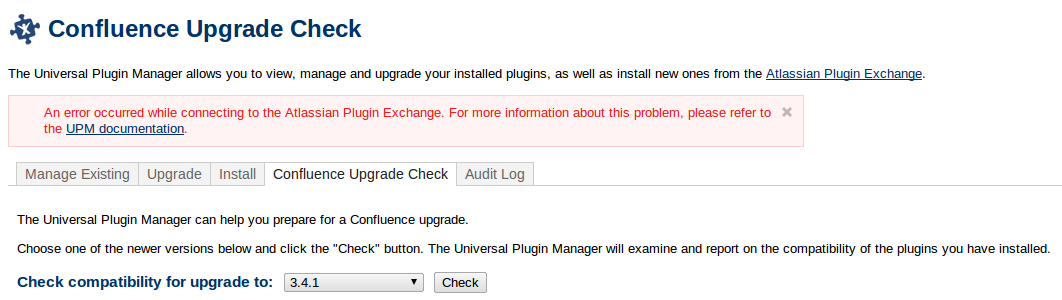
The following error is shown after doing an upgrade check in UPM:
An error occurred while connecting to the Atlassian Plugin Exchange. For more information about this problem, please refer to the [UPM documentation|http://ja.confluence.atlassian.com/display/UPM/Problems+Connecting+to+the+Atlassian+Plugin+Exchange].
原因
This problem happens when the Numbered Headings Plugin is installed in Confluence and the UPM does an upgrade check. This issue is tracked by CONF-20511.
ソリューション
Disable the Numbered Headings plugin when you want to use the Check feature in UPM, you can enable it again after making the check. If you're still getting the same error after disabling the plugin you may need to uninstall it temporarily.
この内容はお役に立ちましたか?