Atlassian Companion アプリで PDF ファイルを開こうとすると "Failure during JWT authentication" エラーが発生する
プラットフォームについて: Data Center のみ。 - This article only applies to Atlassian apps on the Data Center プラットフォーム。
この KB は Data Center バージョンの製品用に作成されています。Data Center 固有ではない機能の Data Center KB は、製品のサーバー バージョンでも動作する可能性はありますが、テストは行われていません。 Server* 製品のサポートは 2024 年 2 月 15 日に終了しました。Server 製品を実行している場合は、 アトラシアン Server サポート終了 のお知らせにアクセスして、移行オプションを確認してください。
*Fisheye および Crucible は除く
要約
Companion アプリでドキュメントを開こうとすると、次のメッセージが表示されて失敗する。
Unexpected response status code 401 from <your_confluence_server>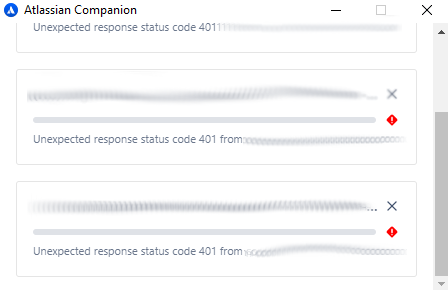
診断
Check if Confluence is running behind an Apache reverse proxy. Also, check the atlassian-confluence.log for a message like the following:
2020-07-XX 11:XX:44,512 WARN [https-jsse-nio2-XXX-exec-2] [jwt.internal.sal.DefaultAuthenticationResultHandler] createAndSendFailure Failure during JWT authentication
 -- url: /conf/download/attachments/XXXXXX/DOCUMENT.pdf | traceId: XXXXXXXXXX
com.atlassian.jwt.exception.JwtInvalidClaimException: Expecting claim 'qsh' to have value 'XXXXXXXXXXXXXXXXXXX' but instead it has the value 'XXXXXXXXXXXXXXXXXXX'
	at com.atlassian.jwt.core.reader.JwtClaimEqualityVerifier.verify(JwtClaimEqualityVerifier.java:29)
	at com.atlassian.jwt.core.reader.NimbusJwtReader.read(NimbusJwtReader.java:151)
	at com.atlassian.jwt.core.reader.NimbusJwtReader.readAndVerify(NimbusJwtReader.java:57)
	at com.atlassian.jwt.internal.DefaultJwtService.verifyJwt(DefaultJwtService.java:49)
	at com.atlassian.jwt.internal.sal.JwtAuthenticatorImpl.verifyJwt(JwtAuthenticatorImpl.java:62)
	at com.atlassian.jwt.core.http.auth.AbstractJwtAuthenticator.verifyJwt(AbstractJwtAuthenticator.jav
原因
The Apache reverse proxy is re-encoding the calls to the backend, causing the QSH key to not match. This, in turn, results in an HTTP 401 (not authorized error) response.
ソリューション
Add a nocanon parameter to the ProxyPass attribute in the Virtual Host setting of Apache:
<VirtualHost *:80>
        ServerName confluence.example.com

        ProxyPreserveHost On
        ProxyPass / http://localhost:8090/ nocanon
        ProxyPassReverse / http://localhost:8090/
</VirtualHost>この内容はお役に立ちましたか?