Inline Comment Popup Does Not Show For Certain Users
プラットフォームについて: Cloud と Data Center - この記事は クラウド プラットフォームとデータセンター プラットフォームの両方に等しく当てはまります。
Server* 製品のサポートは 2024 年 2 月 15 日に終了しました。Server 製品を実行している場合は、 アトラシアン Server サポート終了 のお知らせにアクセスして、移行オプションを確認してください。
*Fisheye および Crucible は除く
要約
問題
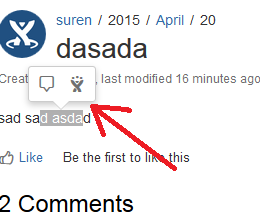
Inline Comment Popup such as the following does not show up for certain users, when a text is highlighted:
診断
Make sure that the user has the permission to add regular comments to the page
Make sure all the modules in the Confluence Inline Comments add-on is enabled (
Confluence Admin >> Manage Add-Ons >> All Add-Ons)
原因
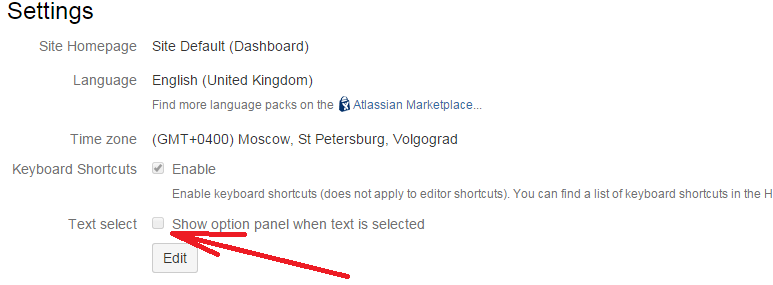
The Text Select feature is disabled in the User's configuration (Click on the user's Profile Picture on the top right corner, and hit Settings):
ソリューション
ソリューション
Click on the user's Profile Picture on the top right corner, and hit Settings
Then hit Edit, and check on the Text Select checkbox. Then hit Submit.
この内容はお役に立ちましたか?