特定の Confluence ページからストレージ形式を取得する方法
プラットフォームについて: Data Center のみ。 - This article only applies to Atlassian apps on the Data Center プラットフォーム。
この KB は Data Center バージョンの製品用に作成されています。Data Center 固有ではない機能の Data Center KB は、製品のサーバー バージョンでも動作する可能性はありますが、テストは行われていません。 Server* 製品のサポートは 2024 年 2 月 15 日に終了しました。Server 製品を実行している場合は、 アトラシアン Server サポート終了 のお知らせにアクセスして、移行オプションを確認してください。
*Fisheye および Crucible は除く
要約
Confluence ページが期待通りに動作していない場合、ページを表示するために使用されている基本的なコードを確認することが役に立つことがあります。アトラシアンサポートでは、このような種類の問題のトラブルシューティングのために、保存形式を要求することがよくあります。
Clarification of Terminology
If you choose

> View Source, you'll see the format used within the editor panel, not the storage format of the page.
If you would like to edit the storage format for a page, your Confluence system administrator will need to install the Confluence Source Editor plugin.
ソリューション
保存形式が必要な対象の Confluence ページを開きます。
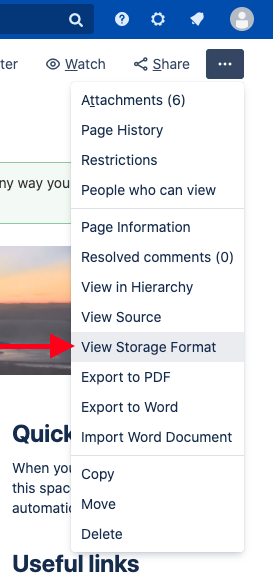
Open the Tools menu by clicking ...
[保存形式の表示] をクリックします。
開いたウィンドウ内のテキストをすべて選択し、そのテキストをコピーします。
任意のテキストエディターにテキストを貼り付けます。
Save as a
.txtfile
詳細情報
See Confluence Storage Format for more information.
この内容はお役に立ちましたか?