How to make a field visible in the Create JIRA Issue dialogue in Confluence
プラットフォームについて: Cloud と Data Center - この記事は クラウド プラットフォームとデータセンター プラットフォームの両方に等しく当てはまります。
Server* 製品のサポートは 2024 年 2 月 15 日に終了しました。Server 製品を実行している場合は、 アトラシアン Server サポート終了 のお知らせにアクセスして、移行オプションを確認してください。
*Fisheye および Crucible は除く
ユースケース
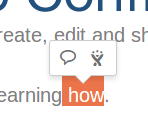
In later versions of Confluence it is possible to create a JIRA issue by highlighting text and clicking the JIRA icon which appears, as shown below:
However, there may be fields that you would like to fill out that do not appear in the Create JIRA Issue dialogue.
ソリューション
If there are fields that you would like to populate when a ticket is created from Confluence, but do not appear, simply make the fields required in JIRA by following the instructions in this document: Specifying Field Behavior.
After the fields are required in JIRA they will appear on the Create JIRA Issue dialogue in Confluence.
この内容はお役に立ちましたか?