How to initialize an empty KEYSTORE with Confluence Data Center
プラットフォームについて: Data Center のみ。 - この記事は、 Data Center プラットフォーム。
この KB は Data Center バージョンの製品用に作成されています。Data Center 固有ではない機能の Data Center KB は、製品のサーバー バージョンでも動作する可能性はありますが、テストは行われていません。 Server* 製品のサポートは 2024 年 2 月 15 日に終了しました。Server 製品を実行している場合は、 アトラシアン Server サポート終了 のお知らせにアクセスして、移行オプションを確認してください。
*Fisheye および Crucible は除く
要約
As part of Atlassian’s commitment to Trust and Security, regarding CVE-2023-22522, newer Confluence versions will no longer allow JSP files to be loaded from the <confluence-install-dir>.
This behavior change makes it impossible to initialize an empty KEYSTORE with the instructions from CONFSERVER-11074, and users are taken to a Page Not Found page when trying to access the URL:
1
<confluence-base-url>/admin/initKeyStore_5_8.jsp Environment:
Confluence DC 7.19 onwards
ソリューション
Steps to initialize the empty Keystore
Make sure that the KEYSTORE table from your instance is empty:
1SELECT * FROM keystore WHERE alias LIKE '%confluence%';Download the file keystore-initializer-1.0.0-SNAPSHOT.jar. Please find below the checksums of the artifacts if you want to validate data integrity:
1
2
# md5 keystore-initializer-1.0.0-SNAPSHOT_2023-12-20T10_11_44.808Z.jar MD5 (keystore-initializer-1.0.0-SNAPSHOT_2023-12-20T10_11_44.808Z.jar) = 04607c7660422076e310efda991f139cInstall the plugin on your instance by manually uploading the .jar file. See Installing Marketplace apps for details (Install an app from a file section).
After installing the plugin, access the following URL on your instance:
1<confluence-base-url>/admin/keystore/initialize.actionYou should be greeted with the following screen:
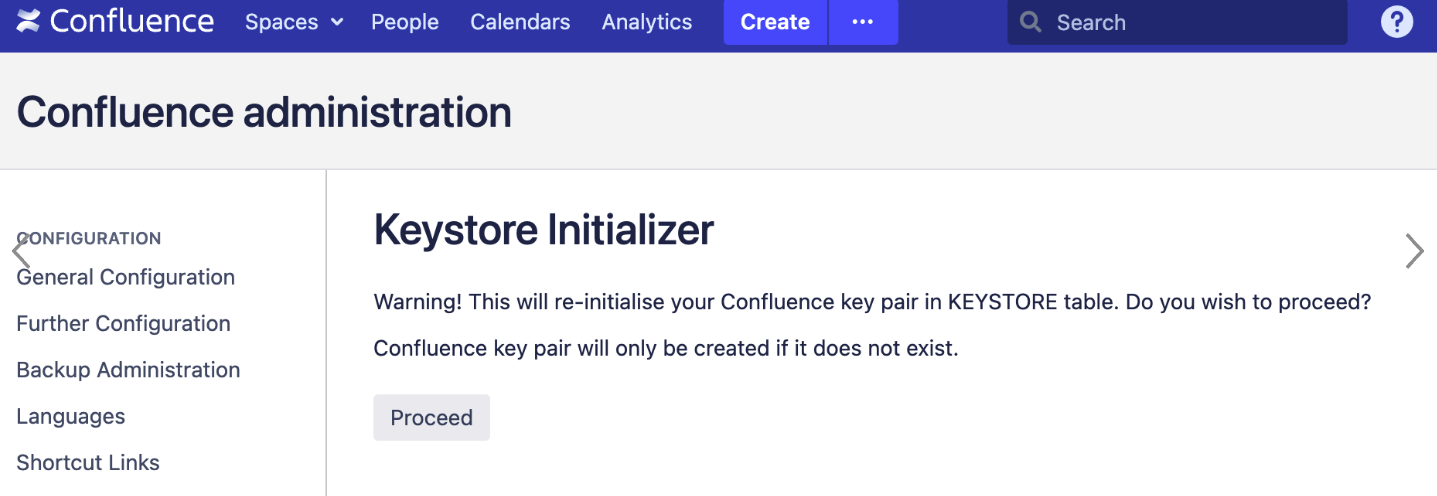
Click on Proceed so that the KEYSTORE table is re-initialized.
Once the process is done, you should see the following message, confirming that the table has been initialized:

Confirm that the KEYSTORE table has been populated with a new key pair (two rows) by running the following query on your database:
1SELECT * FROM keystore WHERE alias LIKE '%confluence%';Uninstall the custom plugin from your instance (keystore-initializer). Details for this can be found on Uninstalling apps.
この内容はお役に立ちましたか?