Dashboard is not rendering properly
プラットフォームについて: Data Center のみ。 - This article only applies to Atlassian apps on the Data Center プラットフォーム。
この KB は Data Center バージョンの製品用に作成されています。Data Center 固有ではない機能の Data Center KB は、製品のサーバー バージョンでも動作する可能性はありますが、テストは行われていません。 Server* 製品のサポートは 2024 年 2 月 15 日に終了しました。Server 製品を実行している場合は、 アトラシアン Server サポート終了 のお知らせにアクセスして、移行オプションを確認してください。
*Fisheye および Crucible は除く
問題
Confluence dashboard is not rendering properly. Here is how it looks:
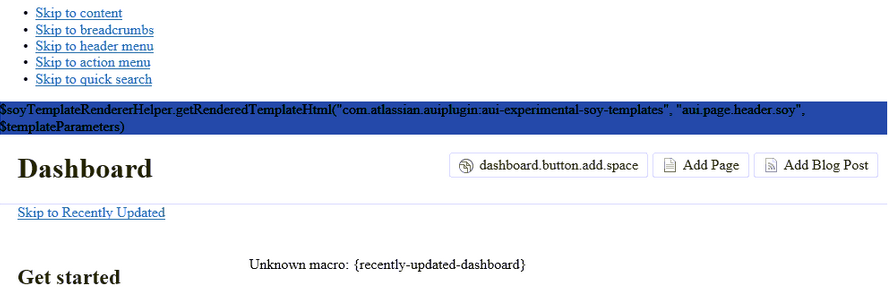
And the following appears in the atlassian-confluence.log:
2014-12-24 15:05:44,092 ERROR [main] [atlassian.event.internal.AsynchronousAbleEventDispatcher] run There was an exception thrown trying to dispatch event 'com.atlassian.plugin.event.events.PluginFrameworkStartingEvent@1cab19e2' from the invoker 'SingleParameterMethodListenerInvoker{method=public void com.atlassian.plugin.osgi.container.felix.FelixOsgiContainerManager.onStart(com.atlassian.plugin.event.events.PluginFrameworkStartingEvent), listener=com.atlassian.plugin.osgi.container.felix.FelixOsgiContainerManager@4ef2ab73}'.
java.lang.RuntimeException: java.util.ArrayList cannot be cast to [Ljava.lang.Class;
	at com.atlassian.event.internal.SingleParameterMethodListenerInvoker.invoke(SingleParameterMethodListenerInvoker.java:54)
	at com.atlassian.event.internal.AsynchronousAbleEventDispatcher$2.run(AsynchronousAbleEventDispatcher.java:66)
	at com.atlassian.event.internal.AsynchronousAbleEventDispatcher$1.execute(AsynchronousAbleEventDispatcher.java:32)
	at com.atlassian.event.internal.AsynchronousAbleEventDispatcher.dispatch(AsynchronousAbleEventDispatcher.java:60)
	at com.atlassian.event.internal.EventPublisherImpl.invokeListeners(EventPublisherImpl.java:152)
	at com.atlassian.event.internal.EventPublisherImpl.publish(EventPublisherImpl.java:71)
	..
	Caused by: java.lang.ClassCastException: java.util.ArrayList cannot be cast to [Ljava.lang.Class;
	at com.atlassian.plugin.spring.SpringHostComponentProviderFactoryBean$SpringHostComponentProvider.provideBeans(SpringHostComponentProviderFactoryBean.java:153)
	at com.atlassian.plugin.spring.SpringHostComponentProviderFactoryBean$SpringHostComponentProvider.provide(SpringHostComponentProviderFactoryBean.java:122)
	at com.atlassian.plugin.osgi.container.felix.FelixOsgiContainerManager.collectHostComponents(FelixOsgiContainerManager.java:482)
	at com.atlassian.plugin.osgi.container.felix.FelixOsgiContainerManager.start(FelixOsgiContainerManager.java:241)
	at com.atlassian.plugin.osgi.container.felix.FelixOsgiContainerManager.onStart(FelixOsgiContainerManager.java:203)
原因
This can be possibly caused by using an unsupported version of Java.
ソリューション
Make sure that you are running your confluence instance on a supported version of Java according to our documentation on Supported Platforms.
更新日時: September 25, 2025
この内容はお役に立ちましたか?
さらにヘルプが必要ですか?
アトラシアン コミュニティをご利用ください。