Create button missing after upgrade on Linux
プラットフォームについて: Data Center のみ。 - This article only applies to Atlassian apps on the Data Center プラットフォーム。
この KB は Data Center バージョンの製品用に作成されています。Data Center 固有ではない機能の Data Center KB は、製品のサーバー バージョンでも動作する可能性はありますが、テストは行われていません。 Server* 製品のサポートは 2024 年 2 月 15 日に終了しました。Server 製品を実行している場合は、 アトラシアン Server サポート終了 のお知らせにアクセスして、移行オプションを確認してください。
*Fisheye および Crucible は除く
要約
症状
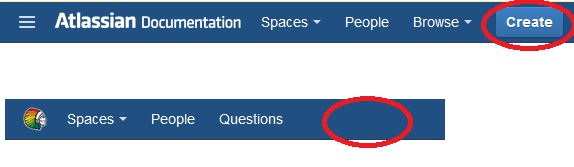
After upgrade, the "Create" button no longer visible.
診断
Go to your Installation directory and Confluence Home Directory, and run below's command to show the folder's permission.
ls -al 原因
The user account running Confluence does not have the permission to write to the home folder.
ソリューション
ソリューション
Make sure that your user have the permission to write on those folder or you can run below's command to gain access to all user.
chmod a+x
The button will be triggered after pressing the shortcut key "C"
この内容はお役に立ちましたか?