Switching branch type in Create Branch screen does not work
プラットフォームについて: Data Center のみ。 - This article only applies to Atlassian apps on the Data Center プラットフォーム。
この KB は Data Center バージョンの製品用に作成されています。Data Center 固有ではない機能の Data Center KB は、製品のサーバー バージョンでも動作する可能性はありますが、テストは行われていません。 Server* 製品のサポートは 2024 年 2 月 15 日に終了しました。Server 製品を実行している場合は、 アトラシアン Server サポート終了 のお知らせにアクセスして、移行オプションを確認してください。
*Fisheye および Crucible は除く
症状
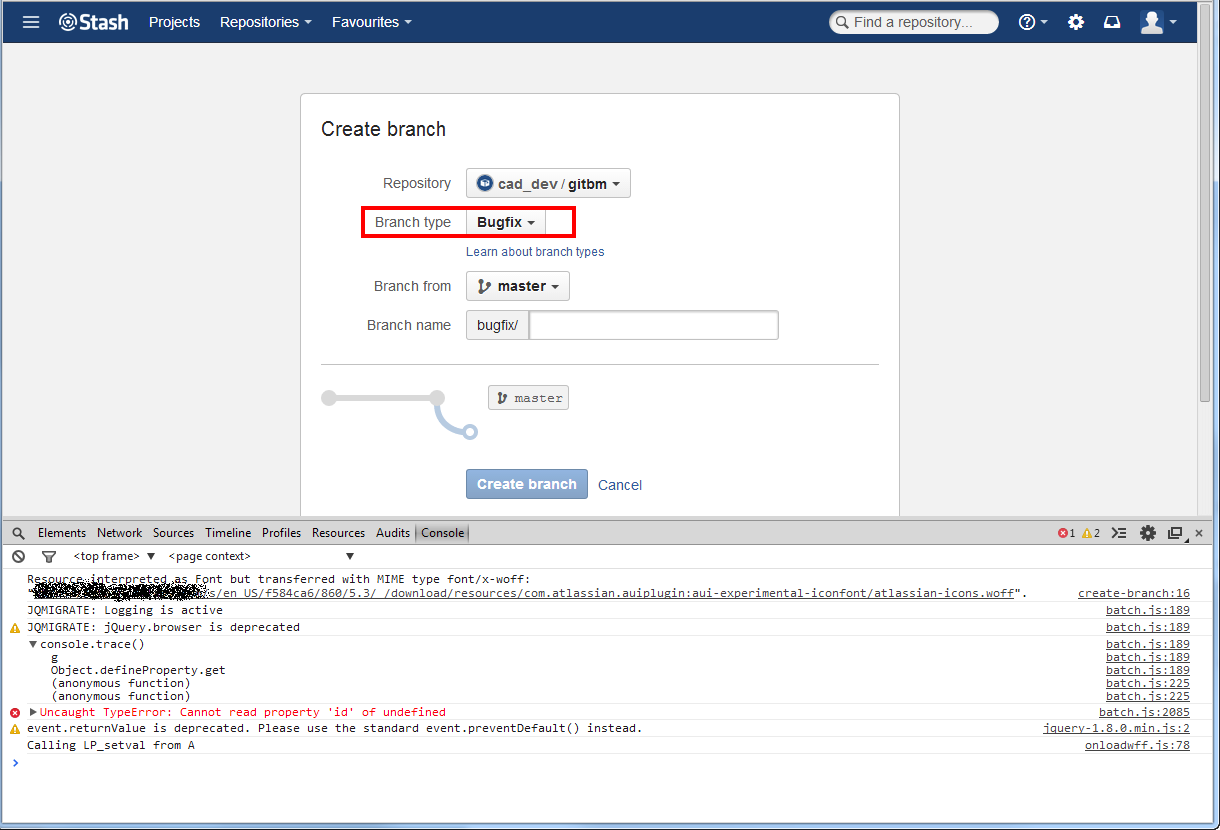
When opening the Create Branch screen and trying to switch the branch type, no matter which one you choose, it stays stuck on branch name "bugfix". The screen below shows the console error:
原因
The Notifyr plugin was found to be causing this issue on a Bitbucket Server 2.10.1 instance . The customer has reported the issue to the vendor through their public issue tracker.
ソリューション
The resolution is to disable the plugin.
この内容はお役に立ちましたか?