Bitbucket Server requires a case-sensitive database, but the target database is case-insensitive.
プラットフォームについて: Data Center のみ。 - This article only applies to Atlassian apps on the Data Center プラットフォーム。
この KB は Data Center バージョンの製品用に作成されています。Data Center 固有ではない機能の Data Center KB は、製品のサーバー バージョンでも動作する可能性はありますが、テストは行われていません。 Server* 製品のサポートは 2024 年 2 月 15 日に終了しました。Server 製品を実行している場合は、 アトラシアン Server サポート終了 のお知らせにアクセスして、移行オプションを確認してください。
*Fisheye および Crucible は除く
症状
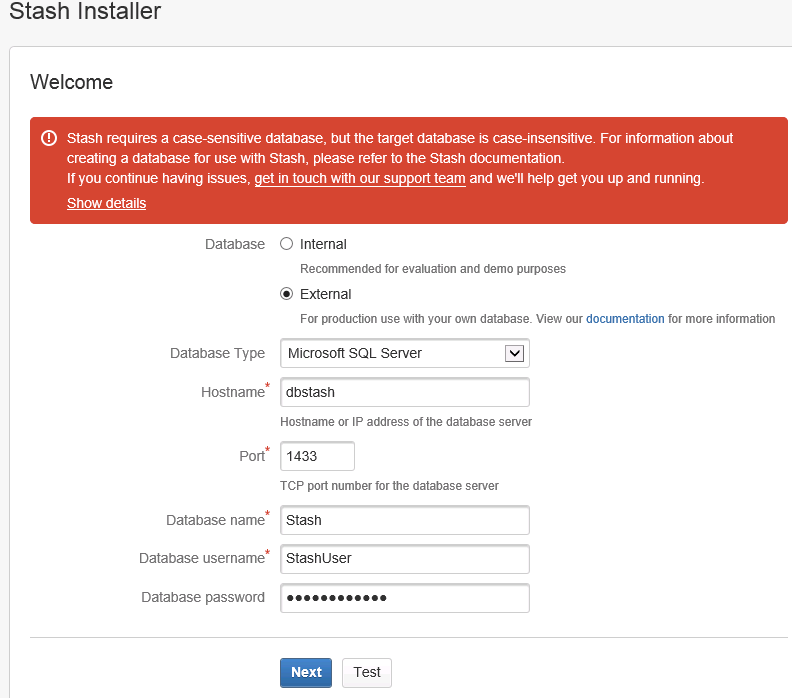
When trying to connect to an external database supported by Bitbucket Server, the following message is displayed:
Bitbucket Server requires a case-sensitive database, but the target database is case-insensitive. For information about creating a database for use with Bitbucket Server, please refer to the Bitbucket Server documentation.The following screen is shown:
原因
Bitbucket Server requires that the database stores its data in a case-sensitive manner for its regular operation.
ソリューション
The instructions on how to set up the database server will depend upon which database you are connecting your instance to. Please refer to the documentation for creating your database listed on Connect Bitbucket to an external database accordingly. Below we highlighted the commands related to the database creation that you need to make sure they were run.
SQL Server
SQL Server> ALTER DATABASE bitbucket COLLATE SQL_Latin1_General_CP1_CS_ASMySQL
mysql> CREATE DATABASE bitbucket CHARACTER SET utf8 COLLATE utf8_bin;ORACLE
Note that it is important to the proper operation of Bitbucket Server that the database store its data in a case-sensitive manner. By changing the values of the NLS_COMP and/or NLS_SORT variables, it is possible to cause Oracle to perform its searches in a case-insensitive manner. We therefore strongly recommend that those variables be left at their default values.
Postgres
CREATE DATABASE bitbucket WITH ENCODING='UTF8' OWNER=bitbucketuser CONNECTION LIMIT=-1;この内容はお役に立ちましたか?