Wrong settings of the user language and locale causes build logs to be shown with a default time 01-Jan-1970 01:00:00
プラットフォームについて: Data Center のみ。 - This article only applies to Atlassian apps on the Data Center プラットフォーム。
この KB は Data Center バージョンの製品用に作成されています。Data Center 固有ではない機能の Data Center KB は、製品のサーバー バージョンでも動作する可能性はありますが、テストは行われていません。 Server* 製品のサポートは 2024 年 2 月 15 日に終了しました。Server 製品を実行している場合は、 アトラシアン Server サポート終了 のお知らせにアクセスして、移行オプションを確認してください。
*Fisheye および Crucible は除く
症状
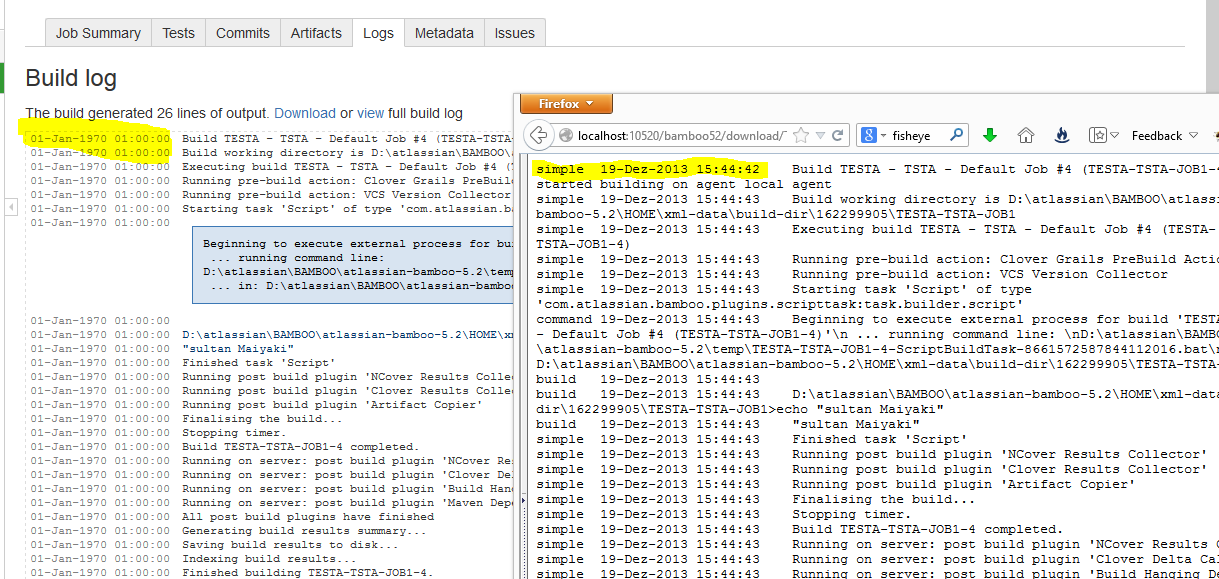
When running bamboo build plans or deployments, the datetime shown in the build logs default to 01-Jan-1970 01:00:00 . If the build logs is however downloaded, the correct time is shown. See the screenshot for the current abnormally
原因
The root of the issue is caused by the fact that the user locale was wrongly set or conflicts with the user language. An example of such is when the user locale is in Swiss and the language is US. This can also happen the other way round. The only rare case where this is displayed correctly is in months where the month abbreviation is same in both languages. In the example above, November is abbreviated as Nov. in both US and Swiss and as such this problem will not be noticeable. For more information about months abbreviation in several locales see http://library.princeton.edu/departments/tsd/katmandu/reference/months.html
ソリューション
Please check and alter the values of this properties as appropriate.
-Duser.language=DE -Duser.country=CH -Duser.timezone=Europe/BerlinIf you are not sure about the values of the above, please check here . For info on how to configure system properties, please see Configuring your system properties
この内容はお役に立ちましたか?