Bamboo Fails to Push to a Protected Branch of a Bitbucket Repository
プラットフォームについて: Data Center のみ。 - This article only applies to Atlassian apps on the Data Center プラットフォーム。
この KB は Data Center バージョンの製品用に作成されています。Data Center 固有ではない機能の Data Center KB は、製品のサーバー バージョンでも動作する可能性はありますが、テストは行われていません。 Server* 製品のサポートは 2024 年 2 月 15 日に終了しました。Server 製品を実行している場合は、 アトラシアン Server サポート終了 のお知らせにアクセスして、移行オプションを確認してください。
*Fisheye および Crucible は除く
問題
Bamboo may need to push to a remote Bitbucket repository if auto-merging is enabled (Branch Updater or Gatekeeper) for a plan or plan branch, as well as when executing various Git tasks (push branch, push tag, commit changes etc). However, if the VCS branch is a protected one, Bamboo should be given an exception.
原因
When Bamboo needs to push to a Bitbucket repository and target branch in a protected branch, git operation fails with the error in job build log:
remote: Branch refs/heads/staging can only be modified through pull requests.
remote: Check your branch permissions configuration with the project administrator.
ソリューション
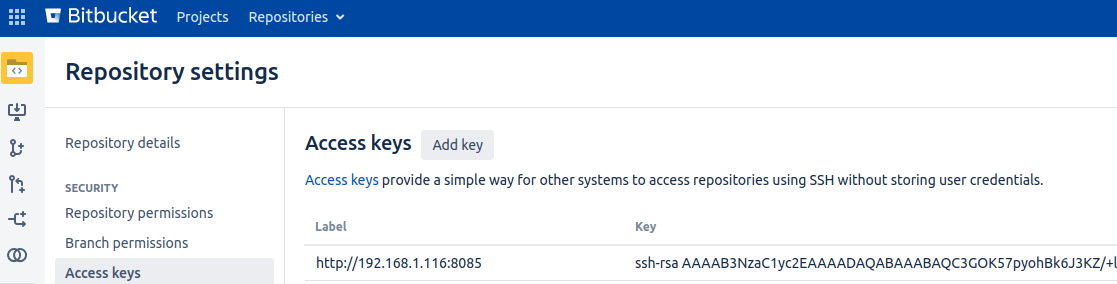
When adding a Bitbucket Server repository to a plan, Bamboo will generate SSH key pair and add a public key to the repository as an Access Token:
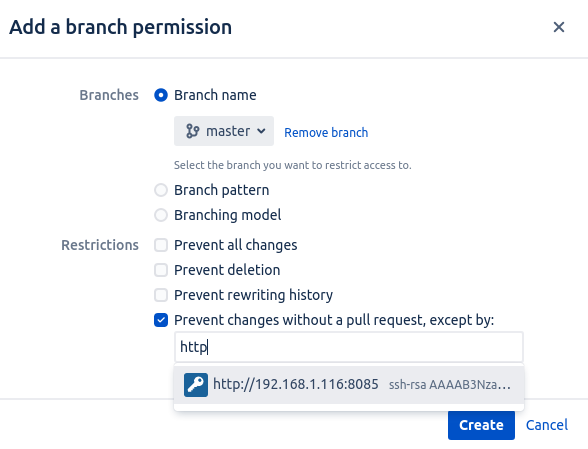
This access key needs to be added as an exception in branch permission rules in the Bitbucket Server repository setting. Start typing http, and you should be able to see the key:
この内容はお役に立ちましたか?