Automation For Jira - すべてのサブタスクがクローズされた後に親課題をクローズするルールを作成する方法
プラットフォームについて: Data Center のみ。 - This article only applies to Atlassian apps on the Data Center プラットフォーム。
この KB は Data Center バージョンの製品用に作成されています。Data Center 固有ではない機能の Data Center KB は、製品のサーバー バージョンでも動作する可能性はありますが、テストは行われていません。 Server* 製品のサポートは 2024 年 2 月 15 日に終了しました。Server 製品を実行している場合は、 アトラシアン Server サポート終了 のお知らせにアクセスして、移行オプションを確認してください。
*Fisheye および Crucible は除く
要約
親課題 (たとえば、タスク/バグ/ストーリー タイプの課題...) の下にサブタスクがある場合、すべてのサブタスクがクローズされた時点で親課題を自動的にクローズするのが望ましいと考えられます。
この記事の目的は、最後のサブタスクがクローズされた時点で親課題を自動的にクローズする自動化ルールを設定する方法を提供することです。
ソリューション
注意点
The rule must be scoped to the project that contains the parent and sub-task issues. If the rule is configured as a global rule, confirm the project is not excluded.
The parent issue's workflow must permit the transition to the destination status attempted by the rule. If the workflow does not allow that transition from the parent's current status, the rule will fail silently — check the audit log for a "transition not available" error.
This article covers only the Data Center automation syntax. The Cloud equivalent uses different components and smart values — don't apply these steps on a Cloud site.
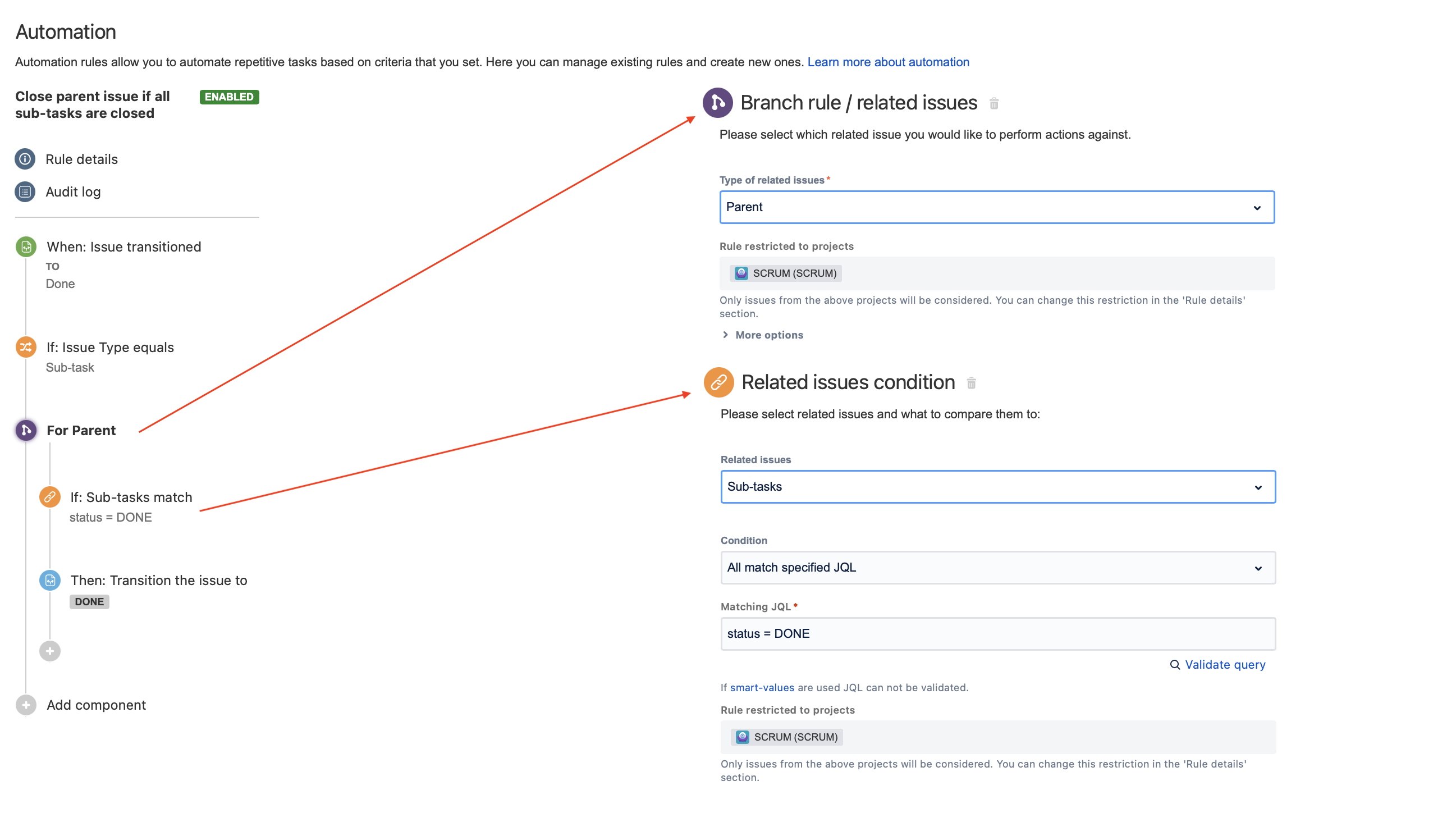
自動化ルールの構成
次のパラメーターを使用して [課題のトランジション時] トリガーを追加します。
ソース ステータス: 空のままにします。
ターゲット ステータス: 課題のクローズ/完了時のワークフロー ステータスを選択します。たとえば、[完了] ステータスなどです。
次のパラメーターを使用して課題フィールドの条件を追加します。
フィールド: 課題タイプ
条件: イコール
値: サブタスク
次のパラメーターを使用してブランチ ルールを追加します。
関連する課題のタイプ: 親
ブランチ ルール内に、次の 2 つのコンポーネントを追加します。
次のパラメーターを使用して関連する課題の条件を追加します。
関連する課題: サブタスク
条件: 指定の JQL にすべて一致
一致する JQL: ステータス = 完了
課題がクローズされたらワークフローで使用されているステータスに必ず変更してください (例: クローズ済み、解決済みなど)
次のパラメーターを使用して [課題をトランジション] アクションを追加します。
次により課題をトランジション: 移動先ステータスの選択
ターゲット ステータス: 完了
課題がクローズされたらワークフローで使用されているステータスに必ず変更してください (例: クローズ済み、解決済みなど)
自動化ルールのスクリーンショット
Confirm if the rule works
Choose a parent issue that has more than one sub-task.
Close every sub-task except one.
Close the last remaining sub-task (transition it to the status you configured in the trigger's To Status field).
Open the parent issue and confirm it has transitioned to the destination status you set in the Transition Issue action (for example, Done).
If the parent does not transition:
Open Project settings > Automation > Rule details and check the Audit log for the rule.
The most common cause is the trigger's To Status not matching the exact status the sub-task enters when it is closed. Verify the status name in the trigger matches the workflow status used by your sub-tasks.
この内容はお役に立ちましたか?