Starting service on Linux throws a No such file or directory error
プラットフォームについて: Data Center のみ。 - This article only applies to Atlassian apps on the Data Center プラットフォーム。
この KB は Data Center バージョンの製品用に作成されています。Data Center 固有ではない機能の Data Center KB は、製品のサーバー バージョンでも動作する可能性はありますが、テストは行われていません。 Server* 製品のサポートは 2024 年 2 月 15 日に終了しました。Server 製品を実行している場合は、 アトラシアン Server サポート終了 のお知らせにアクセスして、移行オプションを確認してください。
*Fisheye および Crucible は除く
要約
問題
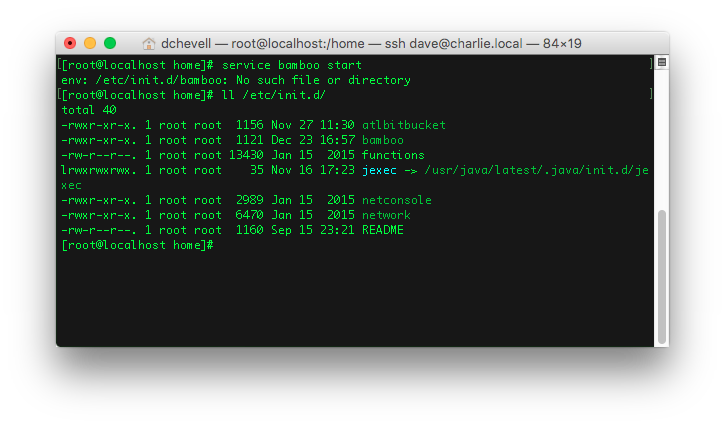
After creating an init script for an application, running the service results in the following error:
env: /etc/init.d/your_init_script: No such file or directory
However, despite this error the init script can be seen in the correct location
診断
環境
This issue may occurs on *nix systems
診断ステップ
次のコマンドを実行します。
cat -v /etc/init.d/your_init_scriptExamine the output, looking for
^Mat the end of each line. These are carriage return characters.
原因
Carriage return characters have been inserted into your init script. Shell scripts may not be read correctly when unexpected carriage returns are encountered. Typically this might occur when the file was created via a Windows system, text editor, or terminal, as Windows uses carriage return + line feed characters for line endings, whereas *nix systems only use line feed characters
ソリューション
ソリューション
Remove the carriage return characters from the init script. This can be done with a sed one-liner:
sed -i -e 's/\r//g' /etc/init.d/your_init_scriptThis will remove the carriage return characters, after which you can start the service successfully
この内容はお役に立ちましたか?