Component Field Type not Rendered Properly In IE8
プラットフォームについて: Data Center のみ。 - This article only applies to Atlassian apps on the Data Center プラットフォーム。
この KB は Data Center バージョンの製品用に作成されています。Data Center 固有ではない機能の Data Center KB は、製品のサーバー バージョンでも動作する可能性はありますが、テストは行われていません。 Server* 製品のサポートは 2024 年 2 月 15 日に終了しました。Server 製品を実行している場合は、 アトラシアン Server サポート終了 のお知らせにアクセスして、移行オプションを確認してください。
*Fisheye および Crucible は除く
症状
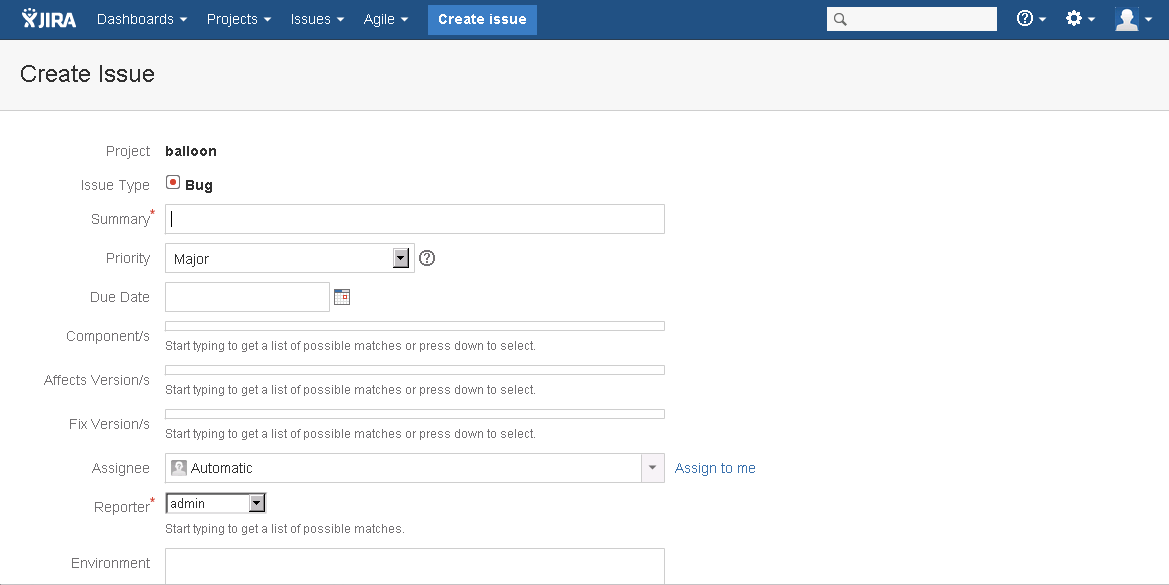
When creating a new issue in JIRA, the Create Issue popup overlay does not appear and the user gets redirected to a new 'Create Issue' page. The Frother fields, which include Component/s, Affects Version/s, and Fix Version/s are not displayed properly in the browser.
原因
This is due to a browser setting in Internet Explorer. Some of these settings may not be configured due to Group Policy (GPO) settings and will require assistance from the network administrator.
ソリューション
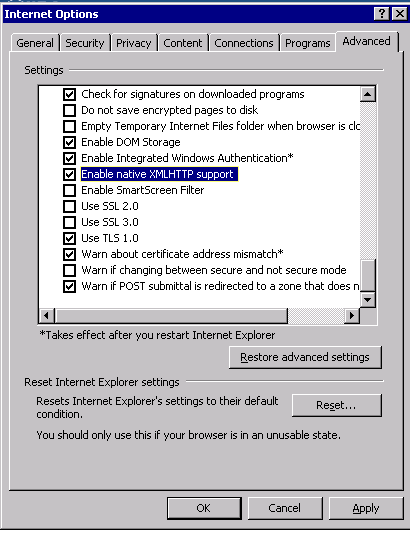
Navigate to Tools > Internet Options > Advanced Tab > Security Section
Verify that the Enable native XMLHTTP support setting is checked as below:
この内容はお役に立ちましたか?