「Microsoft で続行」と SAML SSO の違い
プラットフォームの注記: Cloud のみ - This article only applies to Atlassian apps on the クラウド プラットフォーム上のアトラシアン製品にのみ適用されます。
環境
Atlassian Cloud
Atlassian Guard
Azure AD SAML SSO と Atlassian Cloud Enterprise アプリケーション
SSO 認証ポリシー強制
コンテキスト
ユーザーが Atlassian アカウントで Atlassian Cloud にログインする場合、いくつかのオプションがあります。アトラシアン組織が Azure AD を使用して SAML SSO を構成している場合、一部のユーザーはそれを [Microsoft で続行] オプションと間違える可能性があります。この記事では、さまざまなオプションすべてについて説明します。
要約
When unauthenticated users visit their site URL (Confluence, Jira, etc.) they will be redirected to https://id.atlassian.com/login, the user will then encounter the following screen:
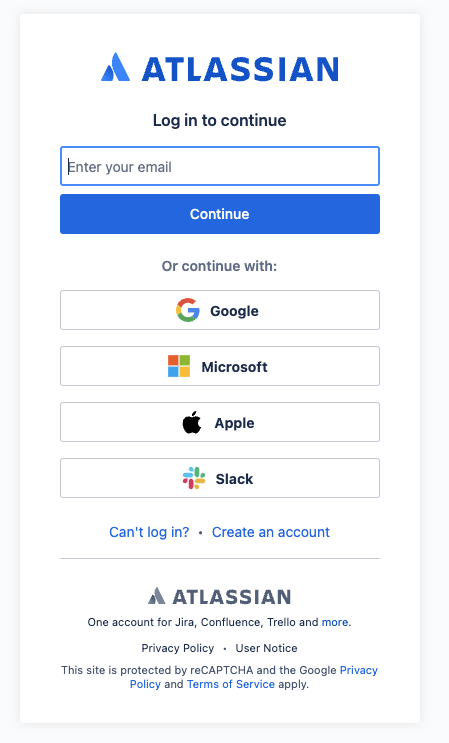
ユーザーのアクションによっては、異なる結果が発生する可能性があります。
If the user is part of an Authentication Policy with SAML SSO enforced and clicks on Continue:
ユーザーは SAML を使用した認証のために IdP (Azure AD) に転送されます。
If the user is part of an Authentication Policy with SAML SSO enforced and clicks on continue withMicrosoft:
ユーザーは Azure AD にリダイレクトされ、Microsoft アカウントを使用して認証を行います。
This process utilizes the OAuth2.0 protocol not SAML, however if the SAML identifier is email it will match the OAuth identifier and kick SAML authentication
このログイン方法を容易にするために、"アトラシアン" という名前の Azure Enterprise アプリが作成されます。
これは Atlassian Cloud Enterprise アプリケーションとは異なるアプリケーションです
The application needs to be approved by an admin, if you want to block the use of this other application you can also decide to modify the Assignment required? to Yes, this will result in the following error to be shown to users during authentication if the continue withMicrosoft option is used:
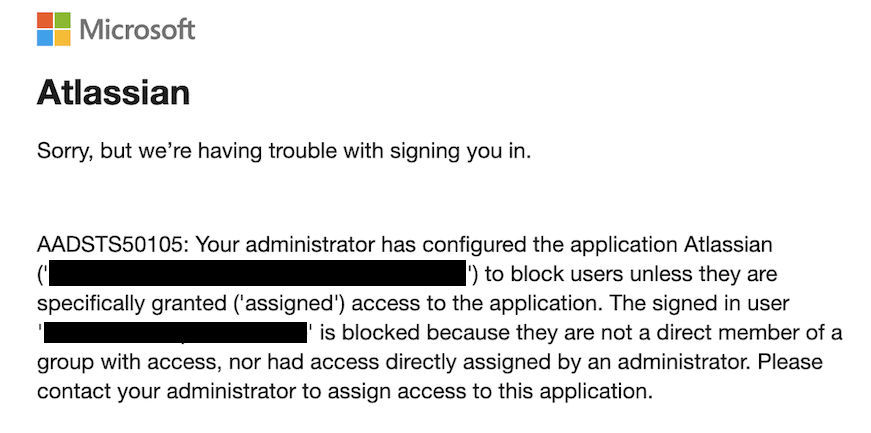
Refer to Log in with a third-party account for further details.
If the user is part of an Authentication Policy without SAML SSO and clicks on Continue:
ユーザーはローカルの Atlassian Cloud パスワードを入力するよう求められます
If the user is part of an Authentication Policy without SAML SSO and click on continue withMicrosoft:
ユーザーは Azure AD にリダイレクトされ、Microsoft アカウントを使用して認証を行います。
ただし、ユーザーが SSO 強制認証ポリシーに含まれていないか、組織内で SAML が設定されていないため、OAuth ワークフローは続行されます
このユース ケースでも、アプリケーションの承認と同じ原則が適用されます
この内容はお役に立ちましたか?