"Your work is safe, but there's an issue" error while publishing a page
Platform Notice: Cloud Only - This article only applies to Atlassian apps on the cloud platform.
Summary
Upon trying to publish a page, the following error message is displayed:
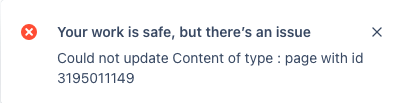
Your work is safe, but there's an issue Could not update Content of type : page with id 123456789
Diagnosis
Confirm that the page was properly published before.
While replicating the issue, inspect the browser's network tab (I.E. Right-click > Inspect > Network). There should have a 400 error code with the following message:
{"statusCode":400,"data":{"authorized":true,"valid":false,"errors":[{"message":{"key":"You need to include the title to update a page.","args":[]}}],"successful":false},"message":"com.atlassian.confluence.api.service.exceptions.BadRequestException: Could not update Content of type : page with id 123456789"}
Cause
Although the page already has a title, in these rare scenarios, Confluence misinterprets it (which can be also a result of copying and pasting from external sources) and does not recognize the existing one.
Since this error is often triggered by copying and pasting a page title from an external source, add: “To avoid this issue, retype the page title manually (or paste it as plain text) rather than pasting it directly from another document or webpage, which can carry hidden formatting characters that Confluence fails to recognize as a real title change.
Solution
While editing the page, edit the page title with some simple actions like adding a blank space and removing it, keeping it as it was. As long as there is a "change" identified in the title, the issue should no longer happen.
Verification
After editing the title and republishing, confirm the fix worked by re-opening the browser's Network tab and verifying the page save request now returns a 200 response instead of the previous 400 error.
Was this helpful?