Task Report Macro not working on some spaces
Platform Notice: Data Center Only - This article only applies to Atlassian apps on the Data Center platform.
Note that this KB was created for the Data Center version of the product. Data Center KBs for non-Data-Center-specific features may also work for Server versions of the product, however they have not been tested. Support for Server* products ended on February 15th 2024. If you are running a Server product, you can visit the Atlassian Server end of support announcement to review your migration options.
*Except Fisheye and Crucible
Problem
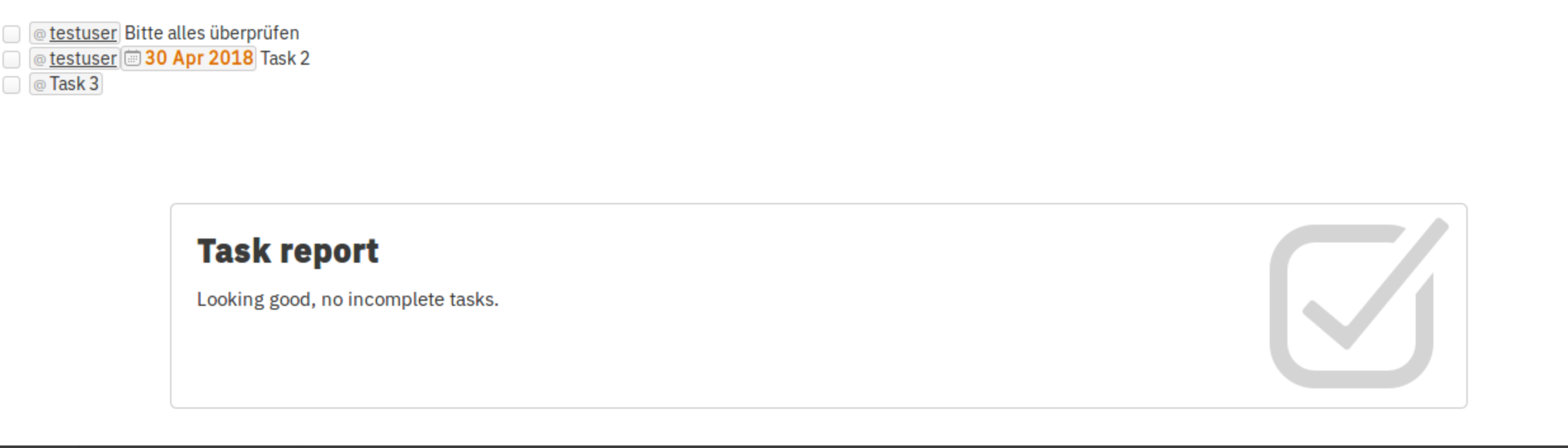
Task report macro not rendering tasks list, on some spaces although you have task list of incomplete tasks .
Diagnostic Steps
First check the problematic space by running below query, make sure that returning SPACESTATUS column value is NULL
select * from SPACES where SPACEKEY = 'test';
Cause
Task report macro renders task list embeded on the mentioned page/space id as resource on the macro paramters.
Since the space status is null so task report macro doesn't have resource to pull from task lists.
NULL SPACESTATUS breaks the Task Report Macro — the macro's underlying query uses WHERE SPACESTATUS <> 'ARCHIVED', and in SQL, NULL <> 'ARCHIVED' evaluates to UNKNOWN (not TRUE), causing those spaces to be excluded.
This mismatch (a space with a NULL SPACESTATUS) most commonly occurs after a partial space-archive/unarchive operation was interrupted, or after a site import/migration that didn't fully populate the column. If this affects multiple spaces, check for a pattern around the same migration or bulk-archive event before treating each occurrence as isolated.
Resolution
Please test changes first on a test environment before applying to Production.
Always take a backup of your database, confluence home and install directories.
Stop Confluence
Check the problematic space by running below query, make sure that returning SPACESTATUS column value is NULL
select * from SPACES where SPACEKEY = 'test';Before running the UPDATE: Confirm the space is genuinely intended to be active. A
NULLSPACESTATUS value (which this article addresses) is an anomalous state — distinct from'ARCHIVED', which indicates a deliberate archival. If the diagnostic query in Step 2 returnedSPACESTATUS = 'ARCHIVED'instead ofNULL, the space was intentionally archived and should not be reactivated without confirming with the space owner. Only proceed with the UPDATE if SPACESTATUS is confirmed asNULL.Take a note of the spaceid from the previous query and use it to update spacestatus to 'CURRENT' status
update spaces set spacestatus = 'CURRENT' where spaceid = '98306' ;Start Confluence
Validate that the task report macro is working properly now
Verify the change is reflected in the UI:
Navigate to the affected space and confirm it loads normally — there should be no "Archived" banner displayed.
Open the Space Directory (☰ > Spaces > Space directory) and confirm the affected space appears in the default list (archived spaces are hidden by default).
Confirm the Task Report Macro on the page now renders the expected task list.
If the space still appears archived or the macro does not render, re-check the SPACESTATUS value in the database and confirm Confluence was fully restarted (all nodes in a Data Center cluster).
Was this helpful?