How to highlight JSON in code block macro
Platform Notice: Data Center Only - This article only applies to Atlassian apps on the Data Center platform.
Note that this KB was created for the Data Center version of the product. Data Center KBs for non-Data-Center-specific features may also work for Server versions of the product, however they have not been tested. Support for Server* products ended on February 15th 2024. If you are running a Server product, you can visit the Atlassian Server end of support announcement to review your migration options.
*Except Fisheye and Crucible
Summary
As described in Code Block Macro, you can add new language highlighting to Code Block macro.
Language files must be correctly formatted JavaScript files and adhere to the Custom Brush syntax
Add New Language removed
Please note that with Confluence 8.9.4 and later, the Add New Language option has been removed to improve platform security and performance.
If you haven’t installed any custom languages, this change won’t affect you.
If you’ve installed custom languages, they will stop working, and code blocks using them will revert to the default language. Java becomes the default for code blocks previously set to a custom language. See also Confluence Release Notes
Solution
Which version are you on?
Confluence version | JSON highlighting options |
|---|---|
Confluence 8.9.4 and later | Use built-in languages only. JSON is not available as a dedicated built-in language. For JSON highlighting, select 'JavaScript' from the language dropdown — it provides reasonable syntax highlighting for JSON content. Alternatively, explore Marketplace apps like Code Pro for Confluence that support additional languages. |
Confluence 8.8 and earlier | Confluence DC 8.8 and earlier still had the Add a New Language feature available. The feature was removed entirely in Confluence DC 8.9 — customers upgrading from 8.8 or earlier to 8.9 or later should plan to remove any previously uploaded custom language apps, as they will no longer function after the upgrade. |
Save below code as JavaScript (*.js) file and add it to Confluence following instructions from Code Block Macro page
Go to Admin > General Configuration > Configure Code Macro.
Choose Add a new language.
Locate your language file and enter a Name for the new language (this will appear when selecting the language).
Choose Add.
;(function()
{
    // CommonJS
    SyntaxHighlighter = SyntaxHighlighter || (typeof require !== 'undefined'? require('shCore').SyntaxHighlighter : null);

    function Brush()
    {
        var keywords =  'false true null';

        this.regexList = [
            { regex: /"([^\\"\n]|\\.)*"(?=:)/g,                         css: 'string' },     // strings
            { regex: /-?(0|[1-9]\d*)(\.\d+)?([eE][+-]?\d+)?/g,          css: 'number' },     // number
            { regex: /"([^\\"\n]|\\.)*"/g,                              css: 'value' },      // value
            { regex: new RegExp(this.getKeywords(keywords), 'gm'),      css: 'keyword' }     // keyword
            ];

        this.forHtmlScript(SyntaxHighlighter.regexLib.aspScriptTags);
    };

    Brush.prototype = new SyntaxHighlighter.Highlighter();
    Brush.aliases   = ['json'];

    SyntaxHighlighter.brushes.Json = Brush;

    // CommonJS
    typeof(exports) != 'undefined' ? exports.Brush = Brush : null;
})();
How to remove any custom language added
After following the steps described above, you should see a new app listed in the 'User Installed' section of the 'Manage Apps' screen:
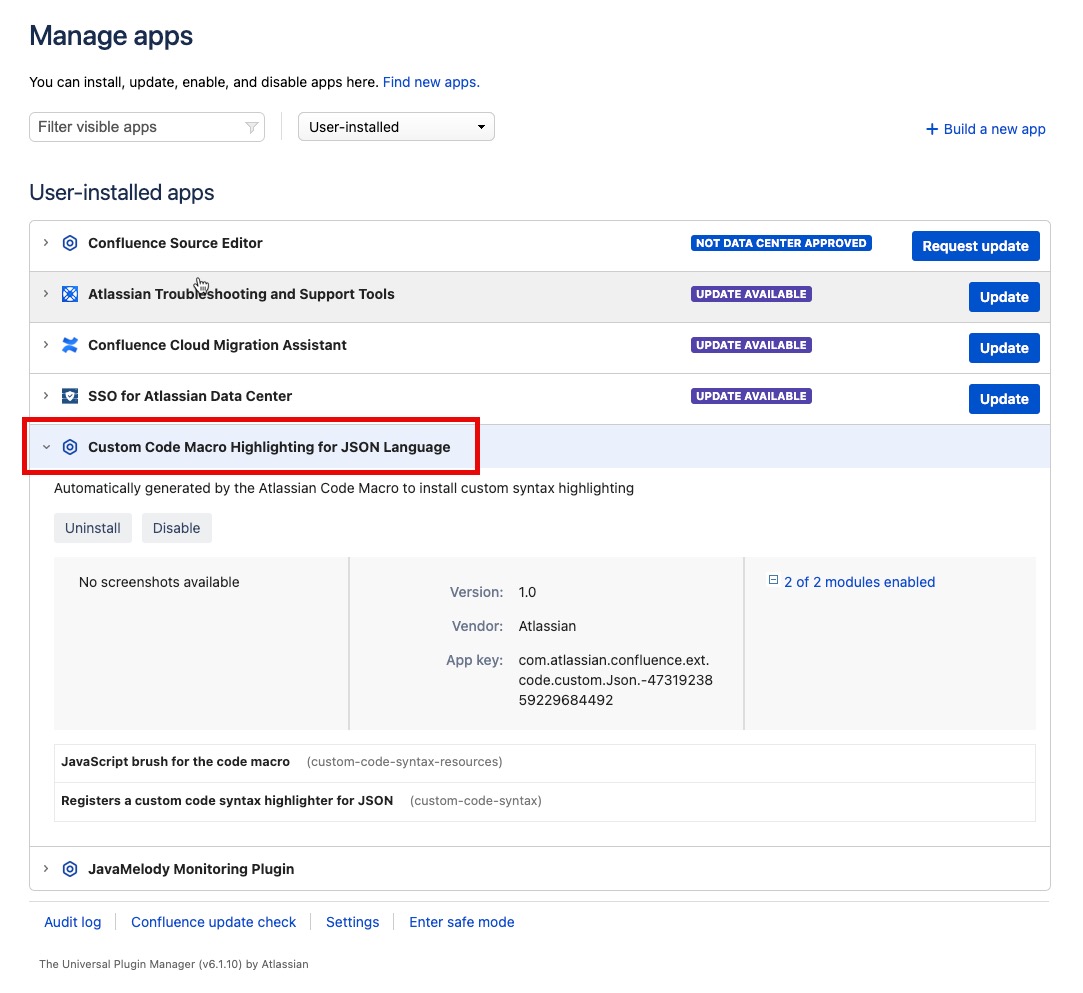
From there, you can disable the app temporarily or remove it totally to remove the highlighting functionality for specific custom language.
Verification
After applying JSON highlighting:
Edit the code block macro. For pre-8.9.4 instances with the custom JSON brush installed: confirm 'json' is selectable in the Language dropdown. For 8.9.4+ instances: select 'JavaScript' as the language instead
Save the page and verify JSON keys, strings, and values render with distinct colors
Test with a complex JSON sample (nested objects, arrays) to confirm parsing
If dedicated JSON highlighting is not available (8.9.4+), 'JavaScript' provides the closest syntax highlighting for JSON content
When this won't help
This article does not cover:
Confluence Cloud — uses different code block rendering (see Cloud-specific KB)
Marketplace code block apps (e.g. Code Pro) — refer to vendor docs
Custom syntax highlighting in confluence-managed templates — out of scope
Related articles
Was this helpful?