How to get Confluence page ID
Platform Notice: Data Center Only - This article only applies to Atlassian apps on the Data Center platform.
Note that this KB was created for the Data Center version of the product. Data Center KBs for non-Data-Center-specific features may also work for Server versions of the product, however they have not been tested. Support for Server* products ended on February 15th 2024. If you are running a Server product, you can visit the Atlassian Server end of support announcement to review your migration options.
*Except Fisheye and Crucible
Summary
When troubleshooting an issue with a Confluence page, Atlassian Support may ask for the Page ID of the affected page.
Because a Confluence page can be accessed through different URL formats, the Page ID may not always help locate an error in the log. It is most useful for locating the page in the database in the CONTENT.CONTENTID column.
Solution
Ensure that the current user has permissions to View and Edit the page
Navigate to a specific page
Go to the ellipses (...) at the top-right of the page
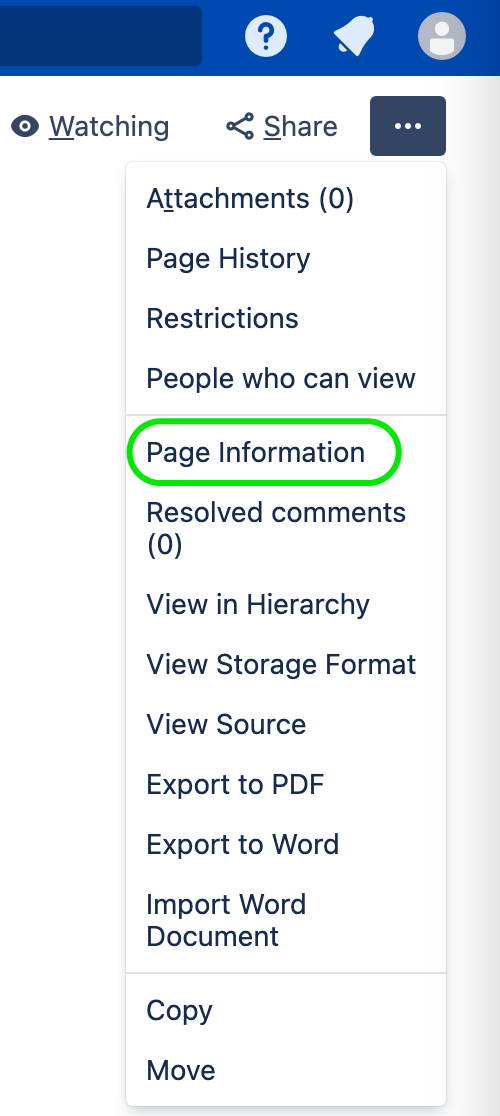
Choose Page Information. Depending on the Confluence version you might find under Advanced Details > Page Information
After choosing Page Information, the URL in the address bar changes. Find the
pageIdparameter in that URL. For example, when the Page Information page opens, the URL changes tohttp://my.domain.com/pages/viewinfo.action?pageId=65541. In this example,65541is the Page ID.
Was this helpful?