How to check for Macros (addon) usage in Confluence Cloud
Platform Notice: Cloud Only - This article only applies to Atlassian apps on the cloud platform.
Summary
You want to pull a report in order to know the usage of add-ons/macros that are installed/used in Confluence Cloud.
Environment
Confluence Cloud
Solution
You need Confluence App Admin access in order to view the Macro Usage report. If you don't have this, ask your site admin to run the report or grant you the required admin access.
Access your Confluence Administration screen.
Explore the Macro Usage section.
The direct link will have the following pattern: https://INSTANCE_URL.atlassian.net/wiki/admin/macro-usage.
On this page, you as a site-admin can basically check for any addons/macro usage in terms of current pages/blogs that contain/use the macro. When you click on the links available, you will get a result search listing all the pages/blogs which are currently making use of such addons/macros.
Example:
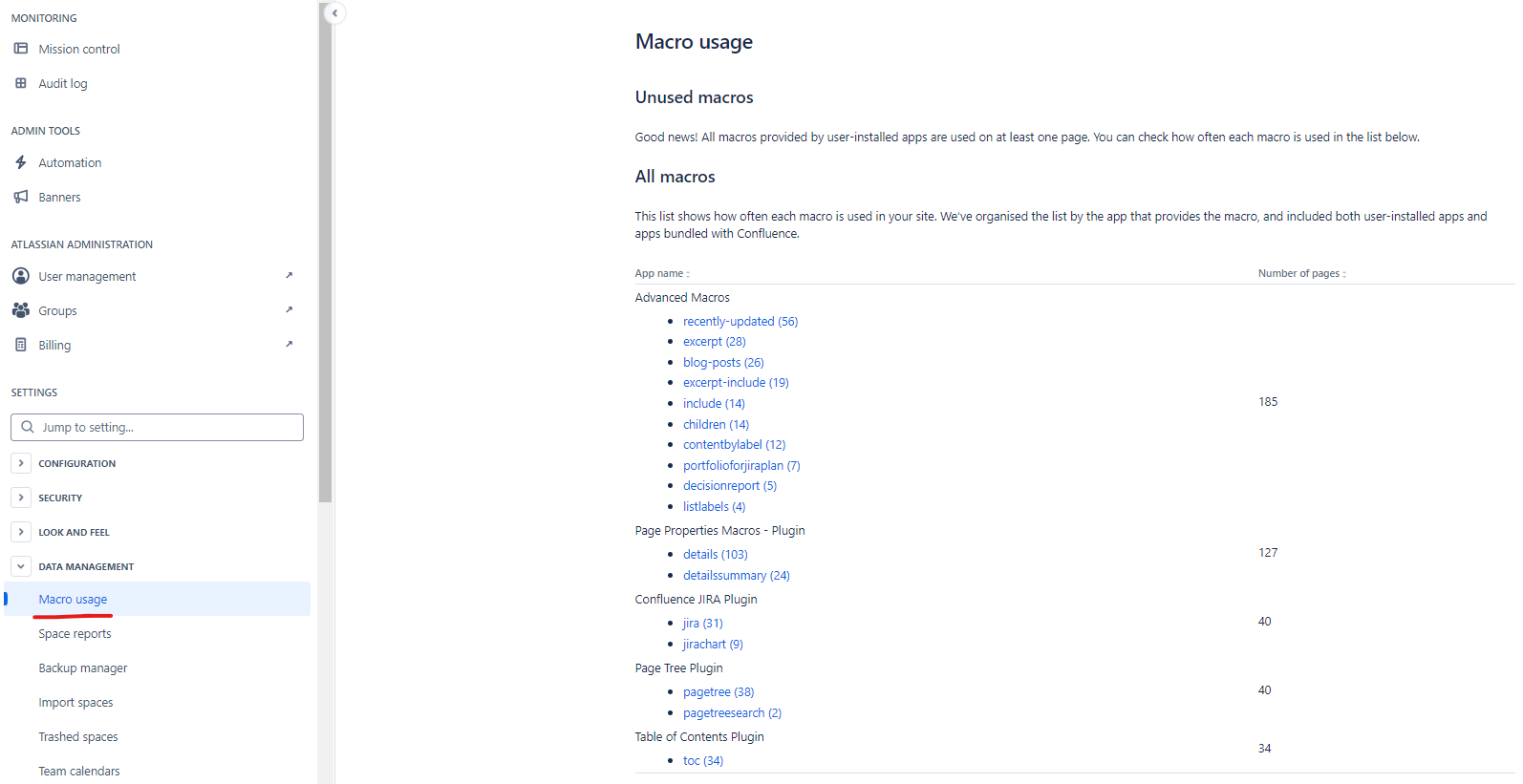
Note: Your user will only be able to see the results for pages/blogs that it currently has access to. Pages/blogs that are restricted to your user won't appear along on the search results due to the restrictive permissions.
Common use case
This report is commonly used before disabling or removing a Marketplace app or a specific macro — run it first to confirm no pages currently rely on that macro, since disabling an in-use macro will break rendering on those pages.
Was this helpful?