Fix Confluence Data Center crashes caused by ClearExpiredRememberMeTokens job
Platform Notice: Data Center Only - This article only applies to Atlassian apps on the Data Center platform.
Note that this KB was created for the Data Center version of the product. Data Center KBs for non-Data-Center-specific features may also work for Server versions of the product, however they have not been tested. Support for Server* products ended on February 15th 2024. If you are running a Server product, you can visit the Atlassian Server end of support announcement to review your migration options.
*Except Fisheye and Crucible
Summary
Confluence Data Center nodes may experience memory exhaustion and crashes during the execution of the Clear Expired Remember Me Tokens scheduled job if the REMEMBERMETOKEN table contains a large volume of records. This article provides steps to manually clean up the table and adjust the job schedule to prevent future heap exhaustion in Atlassian Cloud and Data Center environments.
Environment
This issue affects Confluence Data Center environments with large user bases or long-standing instances where the REMEMBERMETOKEN table has grown significantly.
Diagnosis
The Confluence JVM crashes on the 20th of the month at approximately 4AM. This coincides with the default run setting for the
clearExpiredRememberMeTokensTriggerjob.An extremely large number of records (eg. in the millions) are present in the
clearExpiredRememberMeTokensTriggertable. To check this, run the following:
-- Check total table size
SELECT COUNT(*) FROM remembermetoken;
-- Check how many expired tokens exist
SELECT COUNT(*) FROM remembermetoken WHERE CREATED < (NOW() - INTERVAL '30 days');Ideally a heap dump is captured to verify this issue. If so, the Dominator Tree analysis will show that the majority of the usable heap is retained by a single thread:
Thread: Caesium-1-3 (Confluence scheduled job worker)
Call chain:
  CaesiumSchedulerService.launchJob()
    → DefaultConfluenceRememberMeTokenDao.removeExpiredTokens()
      → DefaultConfluenceRememberMeTokenDao.delete()
        → PgPreparedStatement.executeQuery()
          → PGStream.receiveTupleV3()          ← streaming result set rows
            → SSLSocketInputRecord.decode()
              → SSLCipher.T13GcmReadCipherGenerator.decrypt()
                → GaloisCounterMode.GCMDecrypt.doFinal()   ← large amount of heap retained here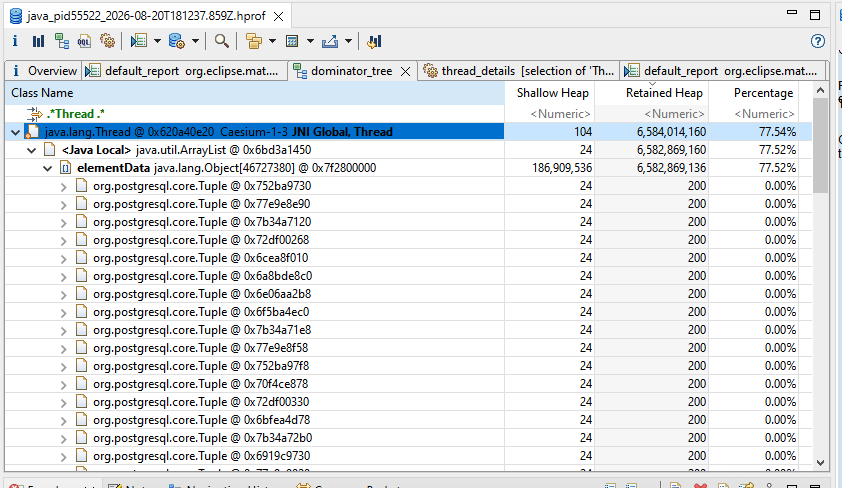
Cause
The ClearExpiredRememberMeTokens job is designed to remove expired authentication tokens from the database. By default, this job runs monthly on the 20th at 4AM.
Depending on the number of expired tokens that need deleting and the size of the heap, the job attempts to process and delete these records in a single transaction, which can consume the majority of the JVM heap which, in turn, can lead to excessive garbage collection and an eventual node crash.
Solution
To resolve this issue, you must manually reduce the size of the affected database table and then increase the frequency of the scheduled job to ensure smaller, manageable batches of deletions.
Step 1: Identify the table size
Run the following queries against your Confluence database to determine the volume of records:
-- Check total record count
SELECT COUNT(*) FROM remembermetoken;

-- Check count of expired tokens (older than 30 days)
SELECT COUNT(*) FROM remembermetoken WHERE CREATED < NOW() - INTERVAL '30 days';
Step 2: Manually delete expired tokens in batches
If the queries above return a large number of records (e.g., in the millions), first perform a manual cleanup:
Stop the Confluence application.
Backup the database.
Execute the following delete statement in batches (e.g., 10,000 to 50,000 rows at a time) to avoid long-running transactions and database locking:
DELETE FROM remembermetoken
WHERE CTID IN (
    SELECT CTID FROM remembermetoken
    WHERE CREATED < NOW() - INTERVAL '30 days'
    LIMIT 10000
);
Repeat the deletion until the query returns 0 rows affected.
(Optionally) Run VACUUM ANALYZE remembermetoken; (for PostgreSQL or equivalent in other DBMSs) to reclaim space and update statistics.
Restart Confluence.
Step 3: Adjust the scheduled job frequency
Change the job schedule from monthly to weekly to prevent large accumulations of expired tokens.
Go to Administration (cog icon) > General Configuration > Scheduled Jobs.
Locate the Clear Expired Remember Me Tokens job.
Choose Edit and change the cron expression to a weekly schedule, such as 0 0 3 ? * SUN (Every Sunday at 3:00 AM).
Choose Save.
Was this helpful?