AUI tabs do not render properly on Confluence pages
Platform Notice: Data Center Only - This article only applies to Atlassian apps on the Data Center platform.
Note that this KB was created for the Data Center version of the product. Data Center KBs for non-Data-Center-specific features may also work for Server versions of the product, however they have not been tested. Support for Server* products ended on February 15th 2024. If you are running a Server product, you can visit the Atlassian Server end of support announcement to review your migration options.
*Except Fisheye and Crucible
Summary
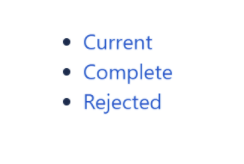
The AUI tabs render as bullet points instead of horizontal navigation guidelines on Confluence versions above 7.0.
Environment
Confluence 7.0+
Diagnosis
Navigate to your Confluence Administration » Manage Apps » Click Show All
Find Confluence HTML Macros
Enable just html-xhtml module
On a Confluence page, insert an HTML macro
Inside the macro, insert the code for the AUI tabs, like the following example:
<div class="aui-tabs horizontal-tabs">
    <ul class="tabs-menu">
        <li class="menu-item active-tab">
            <a href="#Current">Current</a>
        </li>
        <li class="menu-item">
            <a href="#Complete">Complete</a>
        </li>
      <li class="menu-item">
            <a href="#Rejected">Rejected</a>
        </li>
    </ul>
    <div class="tabs-pane active-pane" id="Current">
        <p>test</p>
    </div>
    <div class="tabs-pane" id="Complete">
        <p>test</p>
    </p>
    </div>
      <div class="tabs-pane" id="Rejected">
        <p>test</p>
    </div>
</div>
Save the page.
Expected results:
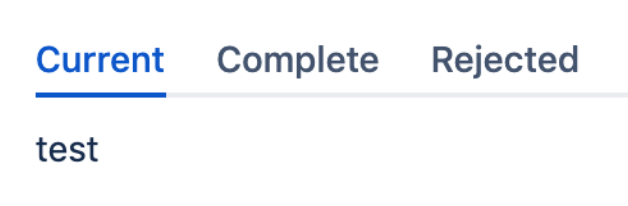
Actual results:
Cause
According to AUI 8 upgrade guides and Preparing for Confluence 7.0, from Confluence 7.0, changes were made on AUI 8.3.5 and aui-tabs won't be loaded by default (super batch). These dependencies were used too much and remove from the super batch will increase performance, but AUI is still providing the resources and could be load by required.
Solution
Workaround
There are two possible workarounds:
Install the free 3rd-party plugin HTML Elements since their source code request the necessaire web-resources.
Add a Custom HTML, as follows:
1. Go to

> General Configuration
2. Find Custom HTML on the sidebar under the Look and Feel section
3. Add these content to HEAD:
<script type="text/javascript"> WRM.require('wr!com.atlassian.auiplugin:aui-tabs'); </script>This will load this web-resource always, except now it will be asynchronous (WRM.require is) so there will be a flash of unstyled content (FOUC) before the CSS and JS for aui-tabs are loaded.
4. Reload the page with the problem
Was this helpful?