Bitbucket Cloud - How to programmatically list merged pull requests from a source branch during branch comparison
Platform Notice: Cloud Only - This article only applies to Atlassian apps on the cloud platform.
Summary
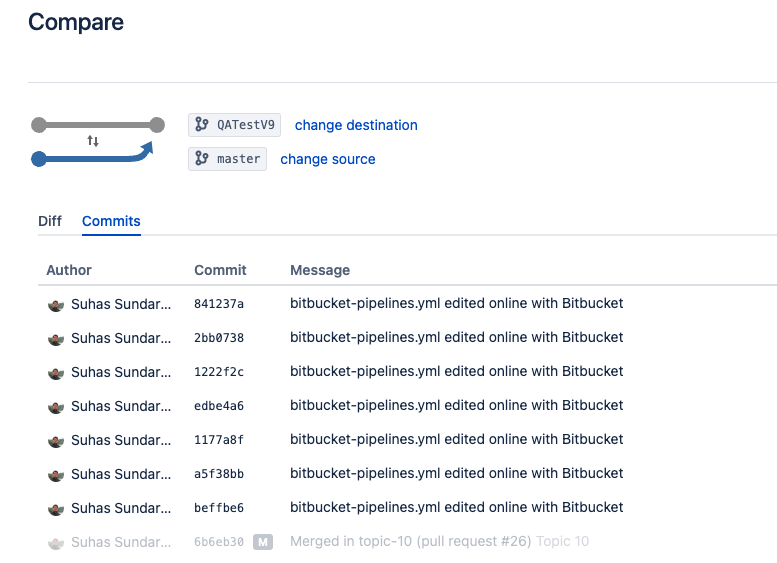
When comparing branches, we can view the commits listed that are part of the source branch, not the destination branch.
Branch Compare Page View:
Previously, the Bitbucket branch compare page had a "merged pull requests" tab, displaying a list of pull requests merged into the source branch.
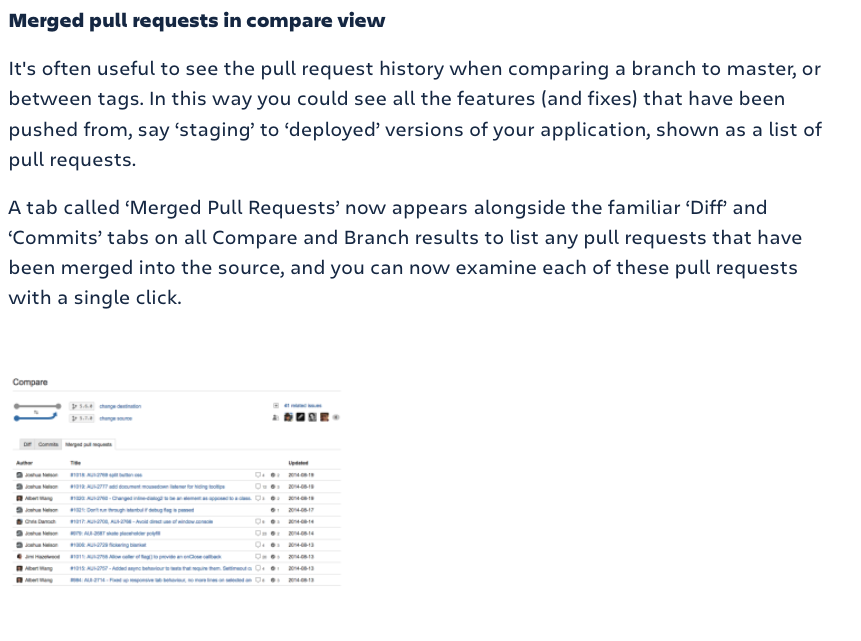
However, this tab has been deprecated, as noted in this Atlassian Community post. There are a couple of workarounds that could be used in place of the missing "merged pull requests" tab:
1. If deployments are configured on the repository: The Deployment card contains a separate tab for "Merged pull requests," allowing users to see the list of merged pull requests associated with the branch being deployed.
2. The Commit view page offers functionality to preview all pull requests associated with a given commit. By utilizing this functionality along with the list of commits from the Branch Compare page, a comprehensive list of pull requests associated with all commits between two branches can be constructed.
However, scenarios may arise where deployments are not configured in the repository, or the list of commits could be extensive (e.g., 30+ commits). Manually accessing each commit page to check associated pull requests can be a time-consuming process.
Solution
The List commits API with the include and exclude parameters, retrieves the commits that are reachable from the source branch but not reachable from the destination branch.
Example:
https://api.bitbucket.org/2.0/repositories/{workspaceID}/{reposlug}/commits/?include=development&exclude=masterUsing include=development and exclude=master in the Bitbucket API call retrieves the commits that are reachable from the development branch but not reachable from the master branch.
The include and exclude parameters in the Bitbucket API are typically used for specifying commit ranges. They do not directly replicate the behavior of git diff A...B. However, you can use them to retrieve commits between two points in the commit history, similar to what git log COMMIT_A..COMMIT_B does.
Once the commits are listed, we can iterate through each commit and list pull requests containing that commit using the Commit Pull Requests API
Example:
https://api.bitbucket.org/2.0/repositories/{workspaceID}/{reposlug}/commit/{commit}/pullrequestsIn summary, we list all the pull requests already part of the source branch using APIs, allowing us to filter merged pull requests with the same. Below is a sample Python script that automates fetching the commits using list commits API and listing pull requests associated with each diff commit using commoit pull requests API, export the final list of pull requests to a CSV file "report.csv".
Sample Python Script:
API Script
#!/usr/bin/env python3
"""
Generate a CSV report of commits between two branches and their associated PRs.

• Auth via Atlassian account email + Bitbucket API token (scope: read:repository, read:pullrequest).
"""

import warnings
warnings.filterwarnings("ignore", category=UserWarning, module="urllib3")

import csv
from datetime import datetime
import requests
from requests.auth import HTTPBasicAuth

# ------------------------------------------------------------------
# 1. CONFIGURATION – fill these in:
# ------------------------------------------------------------------
email             = "your.email@example.com"        # Atlassian account email
token             = "xxxxxxxxxxxxxxxxxxxxxxxxx"     # Bitbucket API token
workspace         = "my-workspace"                  # your workspace ID
repository        = "my-repo"                       # your repo slug
source_branch     = "development"
destination_branch= "master"

# ------------------------------------------------------------------
# 2. HELPER to safely dig into nested dicts
# ------------------------------------------------------------------
def safe(obj, *keys, default=""):
    for k in keys:
        if not isinstance(obj, dict):
            return default
        obj = obj.get(k)
        if obj is None:
            return default
    return obj

# ------------------------------------------------------------------
# 3. Fetch commits between two branches
# ------------------------------------------------------------------
def fetch_commits_between_branches(auth):
    print(f"Fetching commits from '{source_branch}' excluding '{destination_branch}'…")
    url = f"https://api.bitbucket.org/2.0/repositories/{workspace}/{repository}/commits"
    params = {
        "fields": "values.hash,next",
        "pagelen": 100,
        "include": source_branch,
        "exclude": destination_branch,
    }
    commits = []
    while url:
        resp = requests.get(url, auth=auth, params=params, timeout=30)
        resp.raise_for_status()
        data = resp.json()
        commits.extend(data.get("values", []))
        url = data.get("next")
        print(f"  → {len(commits)} commits fetched so far…")
    print("Completed commit fetch.\n")
    return commits

# ------------------------------------------------------------------
# 4. Fetch PRs that include a given commit
# ------------------------------------------------------------------
def fetch_pull_requests_for_commit(commit_hash, auth):
    print(f"  Fetching PRs for commit {commit_hash}…")
    url = f"https://api.bitbucket.org/2.0/repositories/{workspace}/{repository}/commit/{commit_hash}/pullrequests"
    params = {"fields": "values.id,values.title,values.state,values.author.display_name,values.updated_on"}
    resp = requests.get(url, auth=auth, params=params, timeout=30)
    resp.raise_for_status()
    return resp.json().get("values", [])

# ------------------------------------------------------------------
# 5. Main: iterate commits → PRs → build CSV
# ------------------------------------------------------------------
def generate_csv_report():
    auth = HTTPBasicAuth(email, token)
    commits = fetch_commits_between_branches(auth)
    rows = []

    for commit in commits:
        h = safe(commit, "hash")
        prs = fetch_pull_requests_for_commit(h, auth)
        for pr in prs:
            rows.append([
                h,
                pr.get("id", ""),
                pr.get("title", "").replace("\n", " "),
                pr.get("state", ""),
                safe(pr, "author", "display_name"),
                pr.get("updated_on", ""),
            ])

    # Write CSV
    with open("report.csv", "w", newline="", encoding="utf-8") as f:
        writer = csv.writer(f)
        writer.writerow(["Commit Hash","PR ID","PR Title","PR State","Author","Updated On"])
        writer.writerows(rows)

    print("\nCSV report generated: report.csv")

if __name__ == "__main__":
    generate_csv_report()
Sample CSV Output:
Commits | Pull Request | Title | State | Author | Updated On |
26f6bff57d3b2d04cee46ab7ebcf0ee1dae4d00d | 110 | ABC TEST1 | MERGED | Suhas | 2024-06-06T13:20:22.788867+00:00 |
ee1dae57d3b204cee46ab7ebcf0e0ee1dae4d00 | 111 | ABC TEST2 | OPEN | Suhas | 2024-06-06T13:20:22.788867+00:00 |
5711992332b3741189bb66bd36d3332b374118 | 112 | ABC TEST3 | MERGED | Suhas | 2024-06-06T13:20:22.788867+00:00 |
The above CSV output contains all the pull requests (with statuses such as open, merged, and others) associated with the source branch commits. We can filter the merged pull requests if required. This solution also enables other integrations where this data needs to be fetched programmatically. The API helps facilitate this process.
Was this helpful?