How to configure Bamboo to automatically delete offline remote agents
Platform Notice: Data Center Only - This article only applies to Atlassian apps on the Data Center platform.
Note that this KB was created for the Data Center version of the product. Data Center KBs for non-Data-Center-specific features may also work for Server versions of the product, however they have not been tested. Support for Server* products ended on February 15th 2024. If you are running a Server product, you can visit the Atlassian Server end of support announcement to review your migration options.
*Except Fisheye and Crucible
Summary
Bamboo Data Center does not automatically delete offline remote agents by default. Learn how to enable automatic removal to keep your agent list clean.
When an offline agent is deleted, its capabilities and assignments are also removed. This means that other agents may take over performing builds of the previously deleted agent.
Solution
Solution for Bamboo Data Center 9.6.3 to 11.0.0
To ensure that standard remote agents are deleted after they go into the offline state, set the bamboo.delete.remote.agents.on.going.offline system property to true and restart Bamboo.
For example:
-Dbamboo.delete.remote.agents.on.going.offline=trueTo learn how to set Java system properties and startup options for Bamboo, see Configuring your system properties.
Automatic management of offline agents in Bamboo (11.0+)
From Bamboo 11.0, administrators can configure policies to automatically remove offline agents, helping free up agent names, keep data clean, and improve agent‑related performance.
By default, automatic removal is disabled for remote agents and enabled for elastic agents, with cleanup every six hours. When enabled for remote agents, any ephemeral orphan agents are also cleaned up. For more details, see the release notes for Bamboo 11.
Bamboo removes offline agents according to the Offline agent removal setting in Administration > Agents > Overview. By default, removal is disabled for remote agents and enabled for elastic agents, with cleanup every 6 hours.
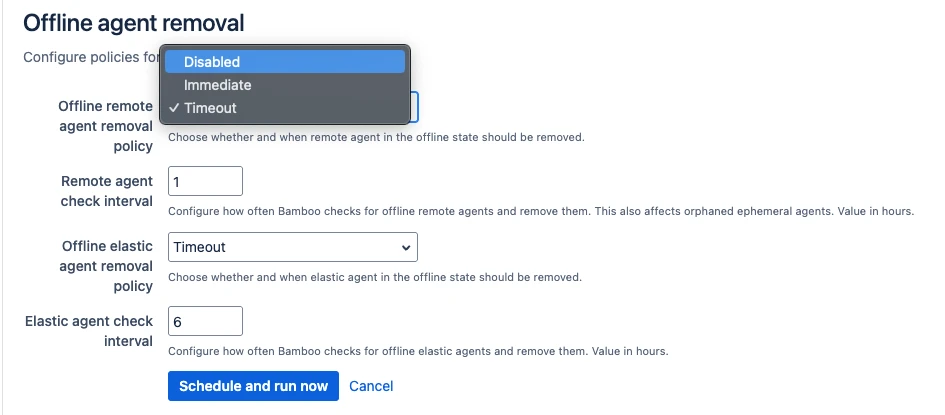
When the policy is disabled, Bamboo does not automatically remove any agents. When enabled, each cleanup run finds all offline agents and either removes them immediately or after the configured timeout, depending on whether the policy is set to Remove immediately or Timeout. Bamboo does not check whether an agent is disabled or has been used in past builds before removing it.
After an agent is removed, past build and deployment results will no longer show agent details for runs that used that agent.
Debug logging
To troubleshoot or verify how automatic offline agent removal is working, you can enable debug logging for the following classes:
com.atlassian.bamboo.agent.automatic.management.AgentAutomaticManagementJobSchedulecom.atlassian.bamboo.agent.automatic.management.OfflineRemoteAgentsRemovalJob
Sample application logs
Below is an example of atlassian-bamoo.log output when the offline agent cleanup jobs run:
Sample application logs for automatic Agent removal
2025-05-21 15:35:50,114 INFO [http-nio-41101-exec-16 url: /b1101/admin/agent/saveOfflineAgentRemoval.action; user: admin] [AgentAutomaticManagementJobScheduler] OfflineRemoteAgentsCleanup running every 1h.
2025-05-21 15:35:50,114 INFO [http-nio-41101-exec-16 url: /b1101/admin/agent/saveOfflineAgentRemoval.action; user: admin] [AgentAutomaticManagementJobScheduler] OfflineElasticAgentsCleanup running every 6h.
2025-05-21 15:35:50,136 INFO [scheduler_Worker-6] [OfflineRemoteAgentsRemovalJob] Found 0 offline remote agents to remove. IDs: []
2025-05-21 15:35:50,136 INFO [scheduler_Worker-10] [OfflineElasticAgentsRemovalJob] Found 0 offline elastic agents to remove. IDs: []
2025-05-21 15:35:50,136 INFO [scheduler_Worker-6] [OfflineRemoteAgentsRemovalJob] Removed 0 offline remote agents out of 0 found
2025-05-21 15:35:50,136 INFO [scheduler_Worker-10] [OfflineElasticAgentsRemovalJob] Removed 0 offline elastic agents out of 0 found
2025-05-21 15:35:50,140 INFO [scheduler_Worker-6] [OfflineRemoteAgentsRemovalJob] Found 0 offline ephemeral agents to remove. IDs: []
2025-05-21 15:35:50,140 INFO [scheduler_Worker-6] [OfflineRemoteAgentsRemovalJob] Removed 0 offline ephemeral agents out of 0 found
FAQ
How does Bamboo decide that an agent is offline? Bamboo periodically checks for agent heartbeats. If Bamboo does not receive a heartbeat during the 30‑second check interval and the configured heartbeatTimeoutSeconds is exceeded, the agent is marked as offline. Offline agents are deleted only when an AgentRemovalPolicy is enabled, and the configured offlineAgentRemovalIntervalHours has elapsed.
Does Bamboo require agents to be both DISABLED and OFFLINE before deleting them? No. The cleanup logic currently only checks whether the agent is offline. It does not disable agents during this process.
Does Bamboo skip agents that are linked to build results? No. The cleanup job currently does not check whether an agent is linked to historical build results. If the Agent Removal Policy is enabled and the offline interval has been reached, the offline agent will be deleted.
What happens to the build results that were linked to a deleted agent? After the offline agent is deleted, the Bamboo build result screens will no longer show any agent information for those historical results.
Feature Requests
BAM-26114-Bamboo Automatic offline agent removal to consider the number of offline days
Was this helpful?