Bitbucket Cloud Repository Configuration Fails in Bamboo with API Tokens
Platform Notice: Cloud and Data Center - This article applies equally to both cloud and data center platforms.
Support for Server* products ended on February 15th 2024. If you are running a Server product, you can visit the Atlassian Server end of support announcement to review your migration options.
*Except Fisheye and Crucible
Summary
Bitbucket Cloud is deprecating app passwords in favor of API tokens to enhance security and provide better management controls. After September 9, 2025, users will no longer be able to create new app passwords in Bitbucket Cloud, and by June 9, 2026, all existing app passwords will stop working. Currently, Bamboo only supports Bitbucket cloud repositories (Global, Project and Plan) using app passwords for authentication. Attempts to use API tokens in Bamboo will fail, preventing users from adding new Bitbucket Cloud repositories once app passwords can no longer be created.
This article explains what this change means for Bamboo users and gives possible solutions to help keep Bamboo running. It also covers what version of Bamboo will support API tokens, how to migrate existing repositories, what to do if you can’t upgrade right away, and how to plan your transition so your builds aren’t interrupted.
Environment
Validated in Bamboo 9.6.15, 10.2.6 and 11.0.3
Diagnosis
Scenario 1: Bitbucket username and API Token are used to authenticate
This error can be seen in the Bamboo UI while fetching the repository list, as displayed in the below screenshot:
"Failed to load data from Bitbucket. 401 Unauthorized."
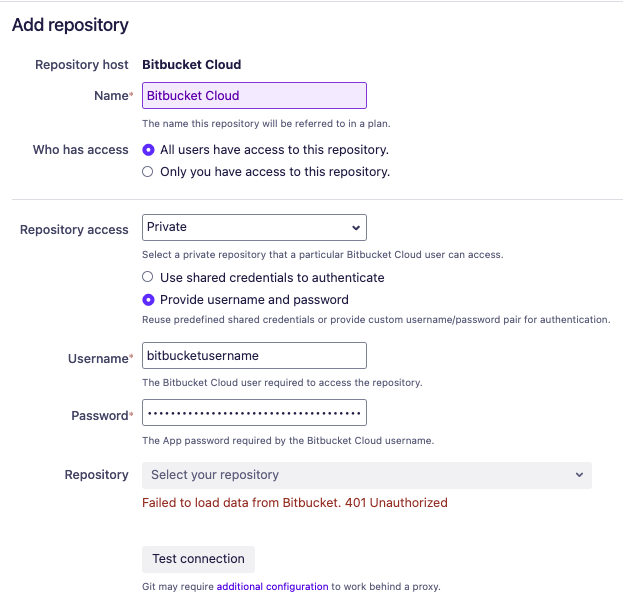
The following error can be observed in the Bamboo logs located at <bamboo-home>/logs/atlassian-bamboo.log:
2025-08-09 10:34:20,418 WARN [http-nio-8085-exec-16 url: /rest/hg/latest/bb/repositories; user: admin] [RESTCall] Response from GET https://api.bitbucket.org/2.0/user/permissions/repositories?pagelen=10&fields=values.repository.name,values.repository.is_private,values.repository.slug,values.repository.owner,values.repository.scm,values.repository.full_name,next&sort=repository.full_name (401)
2025-08-09 10:34:20,423 WARN [http-nio-8085-exec-16 url: /rest/hg/latest/bb/repositories; user: admin] [BitbucketResource] Failed to load data from Bitbucket. Call to https://api.bitbucket.org/2.0/user/permissions/repositories?pagelen=10&fields=values.repository.name,values.repository.is_private,values.repository.slug,values.repository.owner,values.repository.scm,values.repository.full_name,next&sort=repository.full_name returned 401.
Scenario 2: Atlassian Email and API Token are used to authenticate
The following error can be seen in the Bamboo UI when testing the connection, even though the repositories are still fetched:
remote: you may not have access to this repository or it no longer exists in this workspace. If you think this repository exists and you have access, make sure you are authenticated.
fatal: Authentication failed for 'https://bitbucket.org/<workspace_url>'
The following error can be observed in the Bamboo logs located at <bamboo-home>/logs/atlassian-bamboo.log
2025-08-09 10:52:06,866 WARN [http-nio-8085-exec-16 url: /rest/api/latest/repository/testConnection; user: admin] [RESTCall] Response from GET https://api.bitbucket.org/2.0/workspaces/bitbucketuser@email.com/ (404)
2025-08-09 10:52:07,307 WARN [http-nio-8085-exec-16 url: /rest/api/latest/repository/testConnection; user: admin] [RESTCall] Response from GET https://api.bitbucket.org/2.0/users/bitbucketuser@email.com/ (404)
2025-08-09 10:52:07,707 WARN [http-nio-8085-exec-16 url: /rest/api/latest/repository/testConnection; user: admin] [RESTCall] Response from GET https://api.bitbucket.org/2.0/teams/bitbucketuser@email.com/ (404)
2025-08-09 10:52:08,133 INFO [http-nio-8085-exec-16 url: /rest/api/latest/repository/testConnection; user: admin] [RepositoryResource] Testing connection to repository (type: Bitbucket Cloud, location: https://bitbucket.org/workspace-apitoken/testrepo)
2025-08-09 10:52:09,026 INFO [http-nio-8085-exec-16 url: /rest/api/latest/repository/testConnection; user: admin] [RepositoryResource] Failed to connect to repository (type: Bitbucket Cloud, location: https://bitbucket.org/workspace-apitoken/testrepo, time: 892.3 ms, errors: [remote: You may not have access to this repository or it no longer exists in this workspace. If you think this repository exists and you have access, make sure you are authenticated.
 (log message continued...) fatal: Authentication failed for 'https://bitbucket.org/workspace-apitoken/testrepo/'])
Cause
Bamboo is currently configured to retrieve Bitbucket Cloud information using specific Bitbucket Cloud APIs that do not support authentication via API tokens. As a result, API tokens are not compatible with the current design.
Solution
Option 1: Upgrade the Bamboo Version
To address the need for API token authentication, Bamboo now supports API Token authentication starting from Bamboo versions 10.2.7, 11.0.4, and 9.6.16. Upgrading to any of these versions enables you to create repositories using API tokens, while still maintaining compatibility with existing repositories created using App Passwords until June 9, 2026. For further details, please refer to the related feature request: BAM-26156
For step-by-step instructions on creating API tokens, please refer to the official Bitbucket Cloud documentation Create an API token | Bitbucket Cloud | Atlassian Support. For the list of recommended token permissions, please refer to Bitbucket Cloud | Bamboo Data Center 12.1 | Atlassian Documentation. After generating your API tokens, ensure you use your email address (the one associated with the API token creation) as your username, rather than your Bitbucket user ID.
Migrate the existing repositories
After upgrading to the above-mentioned Bamboo version or a later one, you can migrate your existing repositories by following the steps in the knowledge base article below. This will help you prevent any issues after July 28, 2026, when App Passwords are no longer supported.
How to Identify Bitbucket Cloud Repositories Using App Passwords in Bamboo and Migrate to API Tokens
Option 2: Use GIT repository type
If you need additional time to upgrade but still want to use Bitbucket Cloud repositories in Bamboo, you can follow this alternative approach.
The disadvantage of this approach is the features that come with Bitbucket Cloud Integration features, like Webhooks, Pull requests, and Status Updates, will not work.
Instead of creating the Bitbucket Cloud repository type, create a Git repository type in Bamboo.
For the repository configuration:
Set the Repository URL to the Bitbucket Cloud repository's HTTP URL.=
Use x-bitbucket-api-token-auth as the username.
Use your API token as the password.
If the production Bamboo instance is impacted and an upgrade cannot be performed at this time due to the need for careful planning, and the Git repository type cannot be used because of its limitations, it is important to consider the potential risks to ongoing operations.
In situations where neither upgrading nor switching to the Git repository type is feasible, reaching out to the Atlassian Support team. The support team can review the specific circumstances of the environment, provide tailored guidance, and help identify the best path forward to minimize disruption and maintain business continuity.
If you are currently on Bamboo 10.2.7, 11.0.4, and 9.6.16 (or later), you may still encounter issues when creating a new Bitbucket Cloud repository in Bamboo. This is caused by a known issue BAM-26362:Bamboo using deprecated Bitbucket Cloud API - when adding Bitbucket Cloud repository, which relates to an additional set of changes introduced by the Bitbucket cloud API deprecation.
As per the original plan, Bitbucket App Passwords were scheduled to stop working entirely from June 9, 2026. However, based on the latest updates, instead of a complete deprecation on that date, Bitbucket Cloud will now conduct brownout periods between June 9, 2026 and July 28, 2026, as outlined in the Deprecation notice: Bitbucket Cloud app password brownout schedule and next steps. After July 28, 2026, App Passwords will no longer work.
Was this helpful?