"Not all projects related to cross-project boards" error in JCMA preflight
Platform Notice: Data Center Only - This article only applies to Atlassian apps on the Data Center platform.
Note that this KB was created for the Data Center version of the product. Data Center KBs for non-Data-Center-specific features may also work for Server versions of the product, however they have not been tested. Support for Server* products ended on February 15th 2024. If you are running a Server product, you can visit the Atlassian Server end of support announcement to review your migration options.
*Except Fisheye and Crucible
Summary
During the preflight checks of a Jira Server to Cloud migration using JCMA, you may encounter the following warning, as seen in the screenshot:
Not all projects related to cross-project boards and filters have been selected.
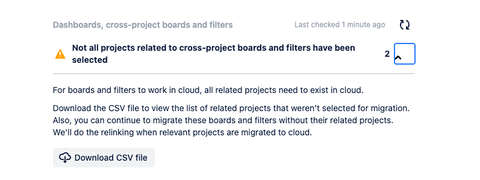
Boards and filters can span multiple projects. For them to function post-migration, all referenced projects must be included in the migration plan. JCMA flags this if any linked projects are missing.
The warning indicates that certain boards or filters refer to projects that have not been selected for migration. If left unresolved, these boards and filters may not function correctly in Jira Cloud.
This warning does not block the migration. JCMA allows you to proceed, but impacted boards or filters may not function properly until all referenced projects are available in the cloud.
Solution
Locate the boards and filters from the warning CSV
Download the CSV file from the JCMA UI to identify the list of related projects not selected for migration.
To identify the affected boards and filters, execute SQL queries based on the downloaded project keys from CSV file. Ensure to include the Project Keys from the CSV file in the second line of your query.
To locate the cross-project boards and filters, see our example SQL queries below. Replace 'PKEY1', 'PKEY2' with the list of selected project keys from your CSV file:
Query Boards referencing multiple projects
WITH selected_projects AS (
    SELECT unnest(array['PKEY1', 'PKEY2', 'PKEY3']) AS pkey -- Add the project keys from the CSV File
),
project_lookup AS (
    SELECT id::text AS project_id_text, pkey FROM project
),
jql_references AS (
    SELECT
        rv."ID" AS board_id,
        sr.reqcontent,
        array_agg(DISTINCT proj.pkey) FILTER (
            WHERE proj.pkey IS NOT NULL AND (
                sr.reqcontent LIKE '%' || proj.pkey || '%' OR
                sr.reqcontent LIKE '%' || proj.id::text || '%'
            )
        ) AS jql_project_keys
    FROM "AO_60DB71_RAPIDVIEW" rv
    JOIN searchrequest sr ON sr.id = rv."SAVED_FILTER_ID"
    JOIN project proj ON (
        sr.reqcontent LIKE '%' || proj.pkey || '%' OR
        sr.reqcontent LIKE '%' || proj.id::text || '%'
    )
    GROUP BY rv."ID", sr.reqcontent
),
shared_projects AS (
    SELECT
        rv."ID" AS board_id,
        array_agg(DISTINCT p.pkey) AS shared_keys
    FROM "AO_60DB71_RAPIDVIEW" rv
    JOIN searchrequest sr ON sr.id = rv."SAVED_FILTER_ID"
    JOIN sharepermissions sp ON sp.entityid = sr.id AND sp.sharetype = 'project'
    JOIN project p ON p.id = sp.param1::int
    GROUP BY rv."ID"
),
combined_projects AS (
    SELECT
        rv."ID" AS board_id,
        rv."NAME" AS board_name,
        sr.reqcontent AS jql,
        COALESCE(sp.shared_keys, '{}') AS shared_keys,
        COALESCE(jr.jql_project_keys, '{}') AS jql_keys,
        array_cat(COALESCE(sp.shared_keys, '{}'), COALESCE(jr.jql_project_keys, '{}')) AS all_keys
    FROM "AO_60DB71_RAPIDVIEW" rv
    JOIN searchrequest sr ON sr.id = rv."SAVED_FILTER_ID"
    LEFT JOIN shared_projects sp ON sp.board_id = rv."ID"
    LEFT JOIN jql_references jr ON jr.board_id = rv."ID"
)
SELECT
    cp.board_id,
    cp.board_name,
    cp.jql,
    cardinality(array(SELECT DISTINCT unnest(cp.all_keys))) AS related_projects,
    array_to_string(array(SELECT DISTINCT unnest(cp.all_keys)), ', ') AS project_keys,
    CASE
        WHEN cardinality(array(SELECT DISTINCT unnest(cp.all_keys))) > 1 THEN 'Multi-project Board'
        ELSE 'Single-project Board'
    END AS board_type,
    CASE
        WHEN EXISTS (
            SELECT 1 FROM unnest(cp.all_keys) AS pk
            WHERE pk NOT IN (SELECT pkey FROM selected_projects)
        )
        THEN 'Missing Projects in Selection'
        ELSE 'All Projects Selected'
    END AS migration_status
FROM combined_projects cp
ORDER BY related_projects DESC NULLS LAST;
Query Filters referencing multiple projects
WITH selected_projects AS (
    SELECT unnest(array['PKEY1', 'PKEY2', 'PKEY3']) AS pkey -- Add the project keys from the CSV File
),
project_lookup AS (
    SELECT id::text AS project_id_text, pkey FROM project
),
jql_references AS (
    SELECT
        sr.id AS filter_id,
        sr.reqcontent,
        array_agg(DISTINCT proj.pkey) FILTER (
            WHERE proj.pkey IS NOT NULL AND (
                sr.reqcontent LIKE '%' || proj.pkey || '%' OR
                sr.reqcontent LIKE '%' || proj.id::text || '%'
            )
        ) AS jql_project_keys
    FROM searchrequest sr
    JOIN project proj ON (
        sr.reqcontent LIKE '%' || proj.pkey || '%' OR
        sr.reqcontent LIKE '%' || proj.id::text || '%'
    )
    GROUP BY sr.id, sr.reqcontent
),
shared_projects AS (
    SELECT
        sr.id AS filter_id,
        array_agg(DISTINCT p.pkey) AS shared_keys
    FROM searchrequest sr
    JOIN sharepermissions sp ON sp.entityid = sr.id AND sp.sharetype = 'project'
    JOIN project p ON p.id = sp.param1::int
    GROUP BY sr.id
),
combined_filters AS (
    SELECT
        sr.id AS filter_id,
        sr.filtername,
        sr.reqcontent AS filter_jql,
        COALESCE(sp.shared_keys, '{}') AS shared_keys,
        COALESCE(jr.jql_project_keys, '{}') AS jql_keys,
        array_cat(COALESCE(sp.shared_keys, '{}'), COALESCE(jr.jql_project_keys, '{}')) AS all_keys
    FROM searchrequest sr
    LEFT JOIN shared_projects sp ON sp.filter_id = sr.id
    LEFT JOIN jql_references jr ON jr.filter_id = sr.id
)
SELECT
    cf.filter_id,
    cf.filtername AS filter_name,
    cf.filter_jql,
    cardinality(array(SELECT DISTINCT unnest(cf.all_keys))) AS related_projects,
    array_to_string(array(SELECT DISTINCT unnest(cf.all_keys)), ', ') AS project_keys,
    CASE
        WHEN cardinality(array(SELECT DISTINCT unnest(cf.all_keys))) > 1 THEN 'Multi-project Filter'
        ELSE 'Single-project Filter'
    END AS filter_type,
    CASE
        WHEN EXISTS (
            SELECT 1 FROM unnest(cf.all_keys) AS pk
            WHERE pk NOT IN (SELECT pkey FROM selected_projects)
        )
        THEN 'Missing Projects in Selection'
        ELSE 'All Projects Selected'
    END AS migration_status
FROM combined_filters cf
ORDER BY related_projects DESC NULLS LAST;
Best practices
Review and update filters or boards referencing projects not selected for migration.
If the projects will be migrated later, proceed with current migration — JCMA will attempt relinking in cloud post-migration.
Consider communicating with project owners about boards/filters that may temporarily lose context.
Post-Migration Tips
Use Jira Cloud admin tools to verify board and filter functionality.
Rebuild filters or boards if necessary using Jira Cloud native capabilities.
Was this helpful?