Web panel servicedesk.portal.request.panels is not accessible.
Platform Notice: Data Center Only - This article only applies to Atlassian apps on the Data Center platform.
Note that this KB was created for the Data Center version of the product. Data Center KBs for non-Data-Center-specific features may also work for Server versions of the product, however they have not been tested. Support for Server* products ended on February 15th 2024. If you are running a Server product, you can visit the Atlassian Server end of support announcement to review your migration options.
*Except Fisheye and Crucible
Summary
This knowledge base article describes a scenario where web panel "servicedesk.portal.request.panels" is not available in JSM environment. The details of Web panels for customer portal can be found in this developer blog.
Environment
JSM 4.x
Diagnosis
We can create testing plugin by following this doc create-a-helloworld-plugin-project
Then we can add into atlassian-plugin.xml of that testing plugin the following code
    <web-panel key="myTestingPanel" location="servicedesk.portal.request.panels">
        <resource name="view" type="static"><![CDATA[<b>Hello World!</b>]] ></resource>
    </web-panel>
Further we can built the plugin with "mvn clean package" , after building we can use the OBR file in target folder to upload into Jira Environment.
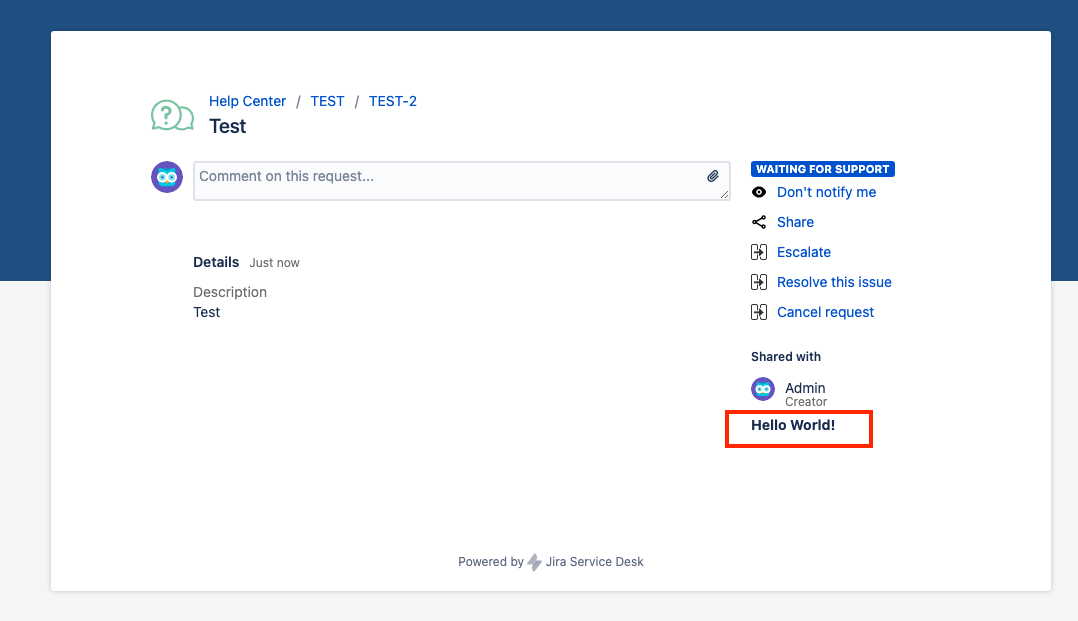
Once plugin is installed, we should observe following in customer portal.
Solution
Web Panelis a set of HTML that will be inserted into a web page.
Web Panel "servicedesk.portal.request.panels" is not available by default. It could be possible that any third party plugins would be using Web Panel with location "servicedesk.portal.request.panels" to customise Customer portal.
Thus user can check atlassian-plugin.xml within the plugins for any such Web Panel. If a Web Panel with location "servicedesk.portal.request.panels" exists then Web Fragment "servicedesk.portal.request.panels" should be available.
Was this helpful?