Fix "One or more of the selected users don't exist or are not valid for this user picker" when creating Jira work item
Platform Notice: Cloud Only - This article only applies to Atlassian apps on the cloud platform.
Summary
This article covers steps for a Jira Admin to resolve the error "One or more of the selected users don't exist or are not valid for this user picker."
Environment
Cloud
Solution
Understanding the cause
This problem is caused by an ineligible user in the field’s default values, and a filter is configured. In this case, ‘ineligible’ can mean that the user(s) either:
have been deactivated
are not allowed values due to the filter configuration
Identifying the problem custom field
First, you’ll need to identify the custom field/fields causing the error that prevents the issue from being created. To do so:
Open the browser's Developer Tools.
Replicate the situation where the error occurred. Look out for any HTTP 400 error, such as:
Request URL:
https://<Cloud Site>.atlassian.net/rest/api/2/issue
Request Method:
POST
Status Code:
400
Go to the Response tab, where you’ll see the Custom Field ID of the field that’s causing the error, as shown below.

The error message will say: {"errorMessages": [],"errors": {"customfield_10044": "One or more of the selected users do not exist or are not valid for this user picker."}}
N.B. This error may be slightly different for those not using English (US), for example, "Pick another user as the selected user doesn't exist."
Fixing the error
Now that you have the custom field ID, you can resolve the error.
Note: This solution only refers to the custom field's type User Picker (multiple users).
Go to ⚙️ > Issues, then choose Custom fields from the navigation.
Find the User Picker (multiple users) custom field from the previous step, then select > Contexts and default value. On this page, you’ll see the contexts in which this field is being used. Select the context that’s relevant to your project or issue type.
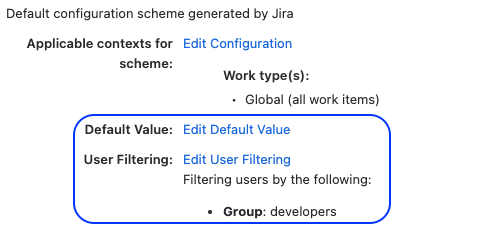
Two leading causes of this error: users have been deactivated, or values are not allowed due to filter configuration.
If a default user is inactive, select Edit Default Value, and update the default value to an active user. Alternatively, you can remove the default value entirely.
If a default user isn’t included in the User Filtering section, use Edit user filtering to check the groups or project roles allowed in the filter, and whether the default user is included in the groups/ project roles.
Alternatively, you can turn filtering off for the custom field context. This will allow all users (including those deactivated) to be set as values of the User Picker (multiple users) custom field.
Was this helpful?