Node stats missing from the clustering page in Jira Data Center
Platform Notice: Data Center Only - This article only applies to Atlassian apps on the Data Center platform.
Note that this KB was created for the Data Center version of the product. Data Center KBs for non-Data-Center-specific features may also work for Server versions of the product, however they have not been tested. Support for Server* products ended on February 15th 2024. If you are running a Server product, you can visit the Atlassian Server end of support announcement to review your migration options.
*Except Fisheye and Crucible
Summary
When going to the Clustering page to verify the Jira Data Center cluster stats, information such as the IP address, load, memory and uptime of some nodes is missing.
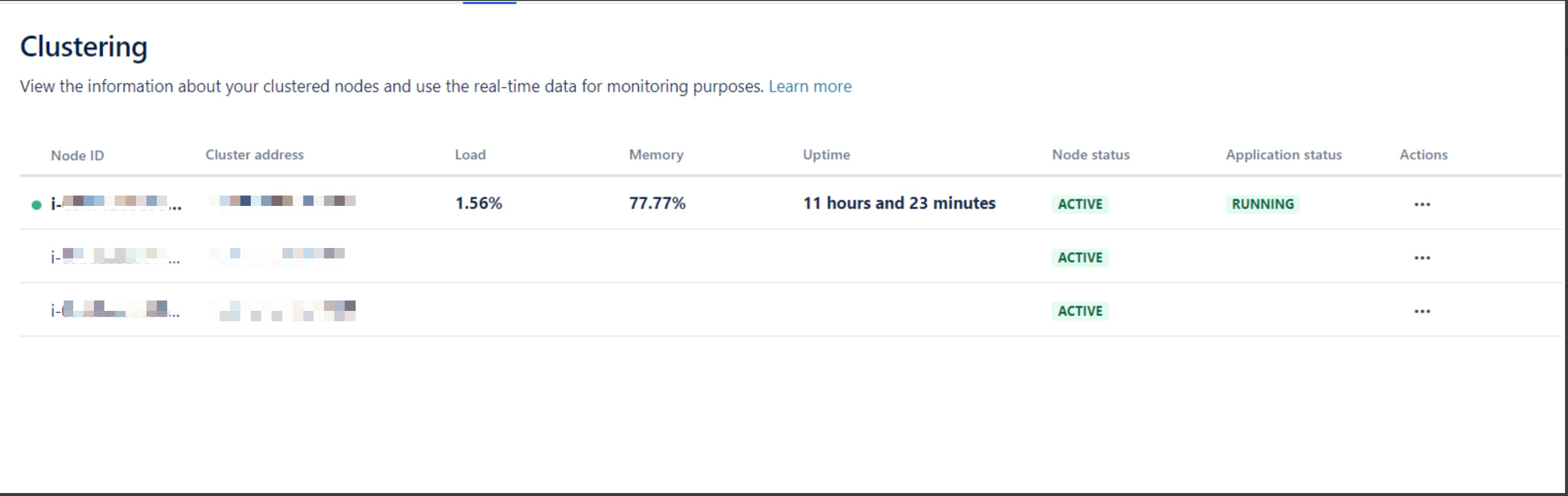
Other functionalities of the application are working properly, such as index replication.
Environment
Jira Data Center with more than 1 node.
Diagnosis
All cluster-related health checks, such as Cluster Cache Replication and Cluster Index Replication, are fine.
Cause
This problem is caused by session stickiness being incorrectly configured on the load balancer or not configured at all. This prevents the clustering page from correctly obtaining the nodes' information.
Solution
Configure session stickiness in your load balancer as explained in Jira Data Center Load Balancer examples.
Was this helpful?