Error occurs when saving SLA after adding a new status to conditions in JSM Cloud
Platform Notice: Cloud Only - This article only applies to Atlassian apps on the cloud platform.
Summary
When attempting to edit the SLA to add additional status, an error is encountered.
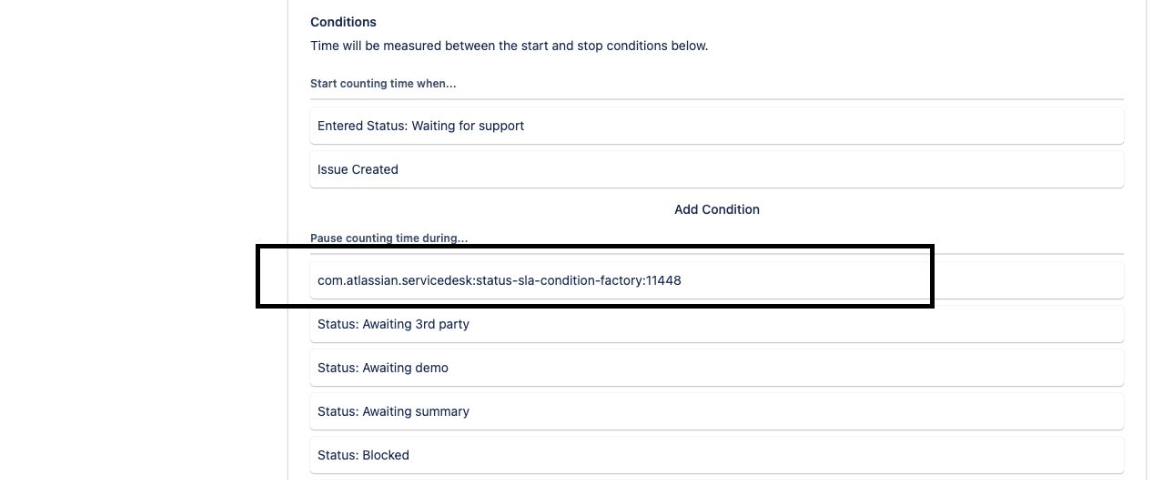
Could not load this condition from server : com.atlassian.servicedesk:status-sla-condition-factory:11448Deleted status
Upon reviewing the SLA configuration, this occurs because a status used in the SLA condition (Start/Finish/Pause) has been deleted from the system. This deletion causes the error when trying to modify the SLA.
Solution
To resolve the issue
Navigate to the affected SLA.
Locate the error (Could not load this condition from server: com.atlassian.servicedesk:status-sla-condition-factory:11448) logged in the SLA condition, either (Start/Finish/Pause condition).
Remove the com.atlassian.servicedesk:status-sla-condition-factory:11448 from either the condition.
Save the SLA.
Edit the SLA again to add the additional status "Done" to the finish condition.
We are tracking a related feature request:
Was this helpful?