Identify Sprint ID in Jira Software Cloud
プラットフォームの注記: Cloud のみ - This article only applies to Atlassian apps on the クラウド プラットフォーム上のアトラシアン製品にのみ適用されます。
要約
Sprint ID numbers can be retrieved from the Jira User Interface (UI) in two easy ways. They are useful when performing bulk import/export tasks and actions via the REST API.
This article applies to Cloud. If you are on Jira Data Center, check out Identify the Sprint ID in Jira Software Data Center
ソリューション
Retrieve sprint ID from JQL search auto-complete
Use JQL Advanced Search to find the sprint by entering its name. As you enter the sprint name, JQL will provide a dropdown with sprints that match your entered characters. Selecting one of these options will convert the sprint name to ID in the JQL search bar.
Navigate to Jira work item search
Begin typing your sprint name
JQL suggests sprints based on the name
Select one of the sprints from the suggested list
The sprint ID will appear in the JQL search query string
Retrieve sprint ID from Jira work item view
Open a work item that is assigned to the sprint
Place your cursor over the sprint name in the Sprint field
The sprint ID will show up in the browser's status bar
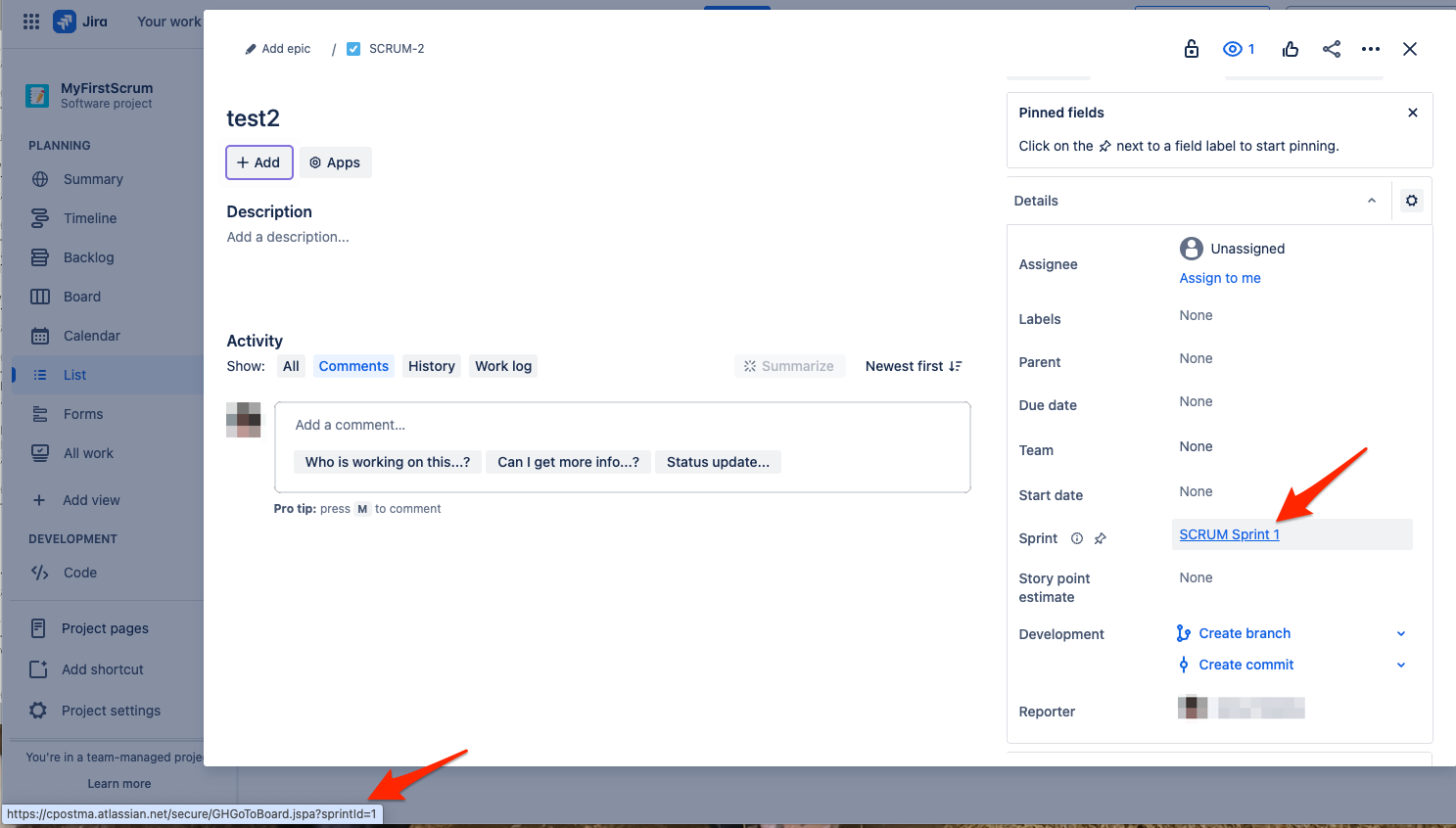
The sprint ID is the number at the end of the string following "sprintId="
この内容はお役に立ちましたか?