Identify the Sprint ID in Jira Software Data Center
プラットフォームについて: Data Center のみ。 - This article only applies to Atlassian apps on the Data Center プラットフォーム。
この KB は Data Center バージョンの製品用に作成されています。Data Center 固有ではない機能の Data Center KB は、製品のサーバー バージョンでも動作する可能性はありますが、テストは行われていません。 Server* 製品のサポートは 2024 年 2 月 15 日に終了しました。Server 製品を実行している場合は、 アトラシアン Server サポート終了 のお知らせにアクセスして、移行オプションを確認してください。
*Fisheye および Crucible は除く
要約
Sprint ID numbers can be retrieved from the Jira User Interface (UI) in several ways. They are useful when performing bulk import/export tasks, actions via the REST API, and SQL queries on Jira DB.
This article applies to Jira Data Center. If you are on Jira Cloud, please checkout Identify the Sprint ID in Jira Cloud
ソリューション
Retrieve sprint ID from Jira issue view
Open an issue, that is assigned to the sprint
Place your cursor over the sprint name in the Sprint field. The sprint ID will show up in the browser's status bar.
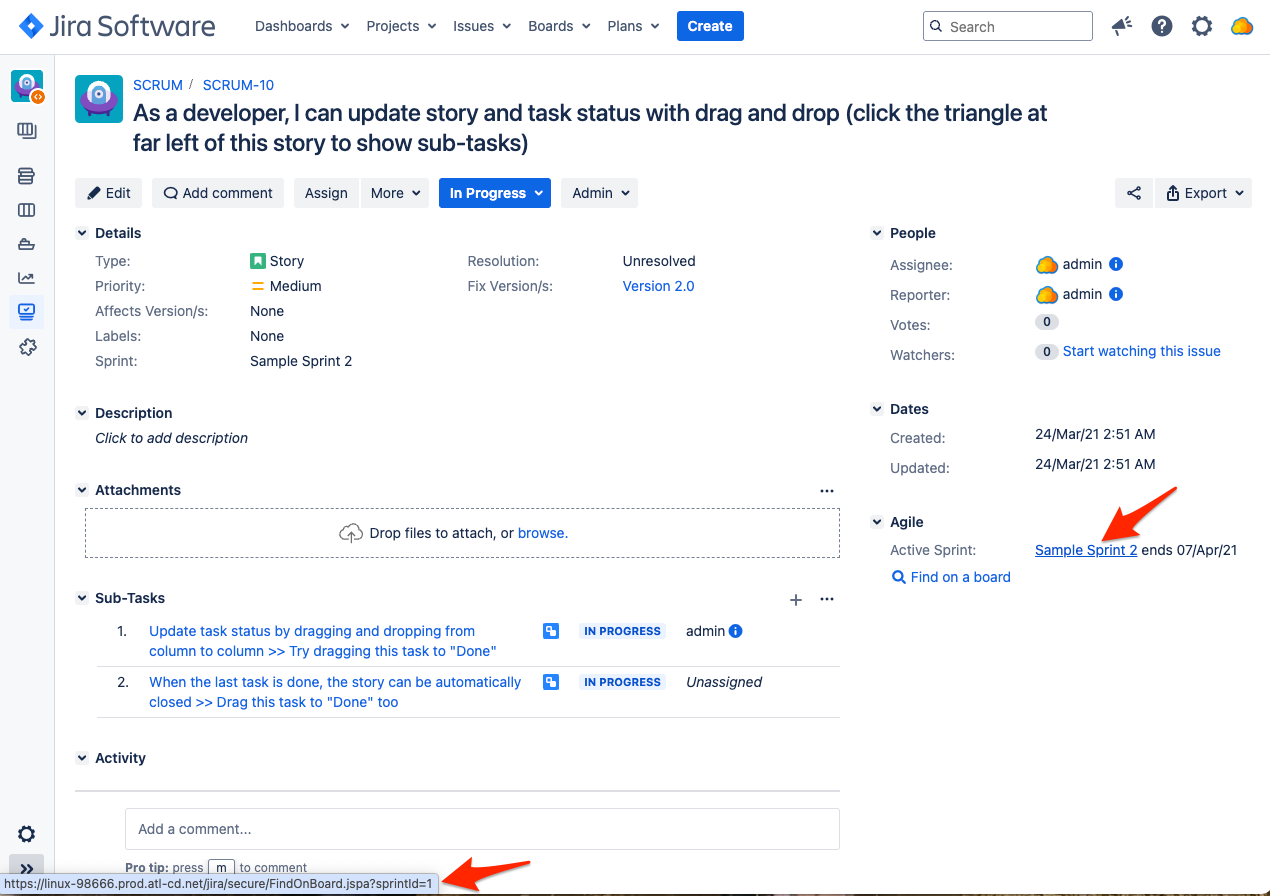
The sprint ID is the numerical value at the end of the string following "sprintId="
Retrieve sprint ID from JQL search auto-complete
Start searching for the Sprint by its name using JQL Advanced Search. As you enter the sprint name, JQL will provide a dropdown with sprints that match your entered characters. Clicking on one of these options will convert the sprint name to ID in the JQL search bar.
Query sprint ID value from Jira Database via SQL
Access the Jira database to query the AO_60DB71_SPRINT table and find Sprint ID values. You can also retrieve the sprint's associated board and filter.
PostgreSQL
SELECT sp."id"             AS sprintID,
       sp."name"           AS sprintName,
       rv."name"           AS boardName,
       rv."id"             AS boardID,
       sr.filtername_lower AS filterName,
       sr.reqcontent       AS filter,
       sr.id               AS filterID
FROM   searchrequest AS sr
       JOIN "ao_60db71_rapidview" rv
         ON sr.id = rv."saved_filter_id"
       JOIN "ao_60db71_sprint" sp
         ON sp."rapid_view_id" = rv."id"
ORDER BY sp."NAME";
例:
PostgreSQL
jira9121=# SELECT sp."ID" as sprintID, sp."NAME" as sprintName, rv."NAME" as boardName, rv."ID" as boardID, sr.filtername_lower as filterName, sr.reqcontent as filter, sr.ID as filterID FROM searchrequest as sr JOIN "AO_60DB71_RAPIDVIEW" rv ON sr.ID = rv."SAVED_FILTER_ID" JOIN "AO_60DB71_SPRINT" sp on sp."RAPID_VIEW_ID" = rv."ID" ORDER BY sp."NAME";

 sprintid |       sprintname        | boardname | boardid |      filtername      |             filter              | filterid
----------+-------------------------+-----------+---------+----------------------+---------------------------------+----------
        6 | Sample Sprint 1         | ES board  |       3 | filter for es board  | project = ES ORDER BY Rank ASC  |    10200
        4 | Sample Sprint 1         | SP2 board |       2 | filter for sp2 board | project = SP2 ORDER BY Rank ASC |    10100
        2 | Sample Sprint 1         | SP board  |       1 | filter for sp board  | project = SP ORDER BY key desc  |    10000
In the above example, we see three sprints with the same name, 'Sample Sprint 1'. Even though the sprints can share the same name, they must be assigned unique ID numbers. They also belong to three different project boards, which can help us select the correct sprint ID for the correct project.
この内容はお役に立ちましたか?