Confluence のページ ID を取得する方法
プラットフォームについて: Cloud と Data Center - この記事は クラウド プラットフォームとデータセンター プラットフォームの両方に等しく当てはまります。
Server* 製品のサポートは 2024 年 2 月 15 日に終了しました。Server 製品を実行している場合は、 アトラシアン Server サポート終了 のお知らせにアクセスして、移行オプションを確認してください。
*Fisheye および Crucible は除く
要約
Confluence ページのトラブルシューティングを行う際、アトラシアン サポートで対象のページのページ ID を確認させていただく場合があります。
ℹ️ As Confluence page can be accessed via different URL Formats, PageID can't always guarantee to be able to help locate an error in the log, but it is most useful when trying to locate the page in the database in the CONTENT.CONTENTID column.
ソリューション
対象のページの表示および編集権限を持つユーザーであることを確認します。
対象のページに移動します。
Go to the ellipses (...) at the top-right of the page
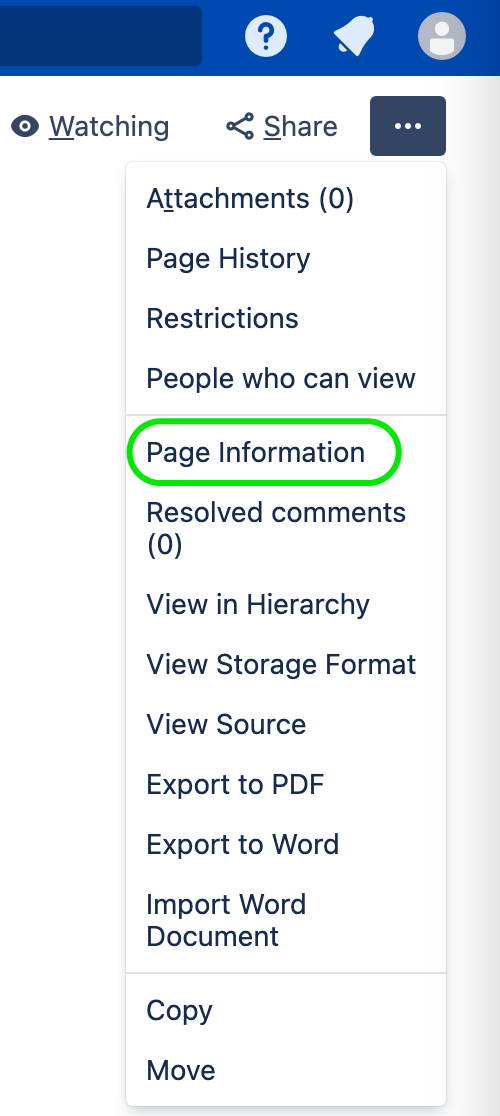
Choose Page Information. Depending on the Confluence version you might find under Advanced Details > Page Information
アドレス バーの URL が変更されます。
ページ ID が URL にパラメータとして表示されます。
e.g.: When Page Information page is opened, the URL will change to http://my.domain.com/pages/viewinfo.action?pageId=65541
In the example above, 65541 is the Page ID.
この内容はお役に立ちましたか?