Image attachments with a colon character (':') do not load after upgrading Confluence
Platform Notice: Data Center Only - This article only applies to Atlassian apps on the Data Center platform.
Note that this KB was created for the Data Center version of the product. Data Center KBs for non-Data-Center-specific features may also work for Server versions of the product, however they have not been tested. Support for Server* products ended on February 15th 2024. If you are running a Server product, you can visit the Atlassian Server end of support announcement to review your migration options.
*Except Fisheye and Crucible
Summary
After upgrading Confluence on Microsoft Windows, Confluence is unable to display images that have a colon character (':') in the attachment file name.
Environment
The following Confluence versions running on Microsoft Windows operating system are affected:
Confluence 7.11.6
Confluence 7.12.1 and later
Diagnosis
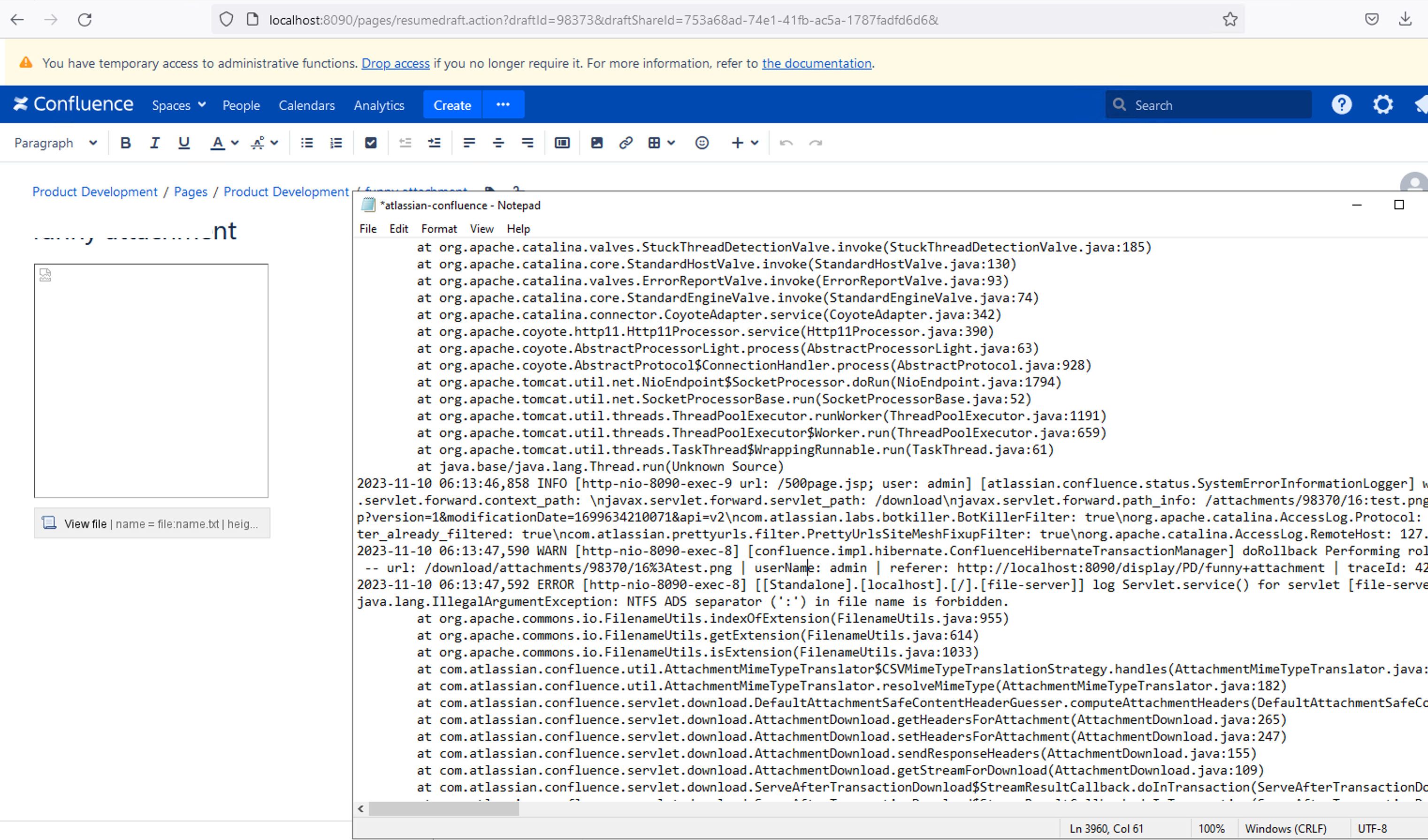
Attachments on a Confluence page containing a colon character (':') in their file name will display a broken image on the View page and on the Edit page:
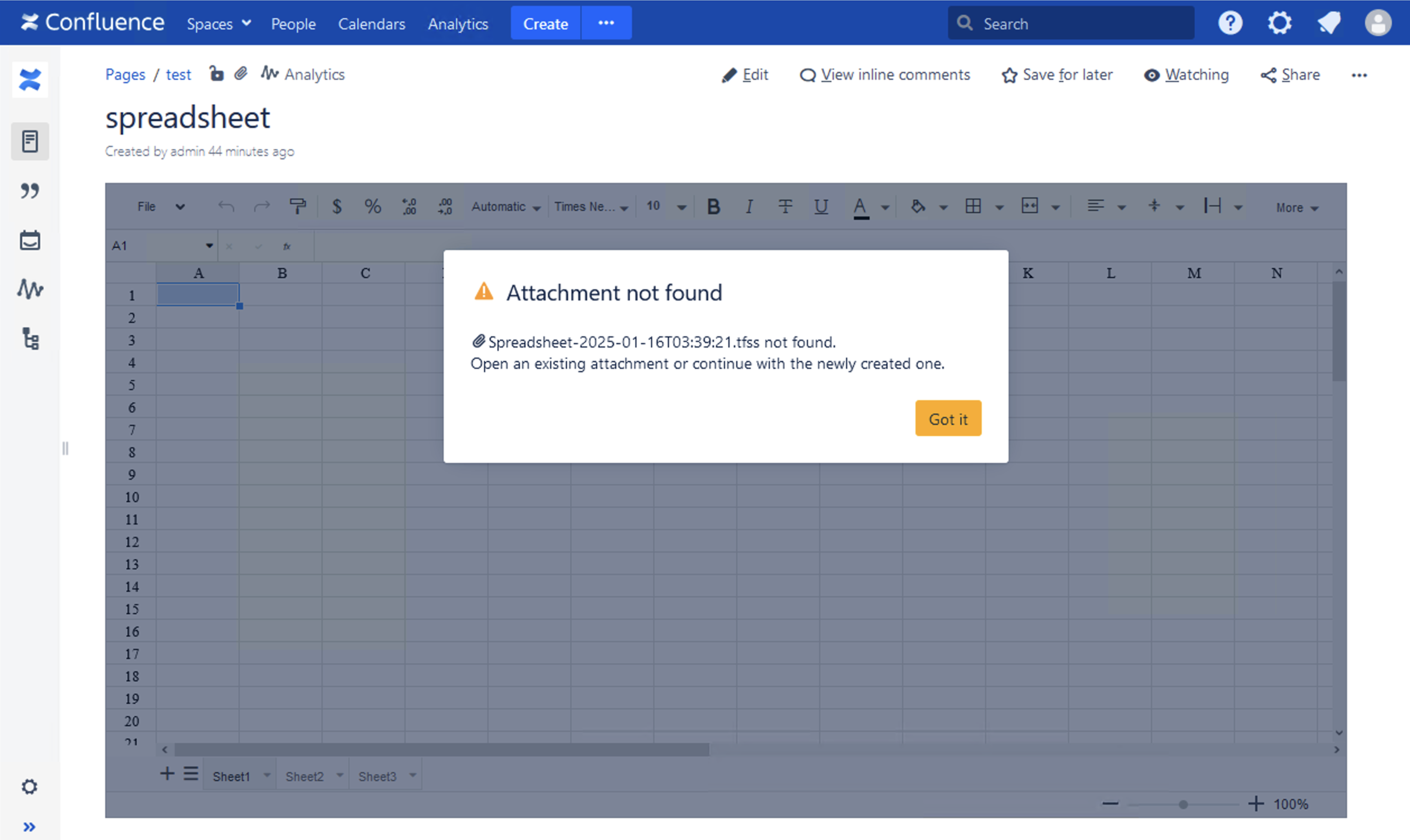
Embedded Spreadsheet macro from the Table Filter, Charts & Spreadsheets for Confluence app show "Attachment not found" message on the View page or the attempt to Edit spreadsheet:
The application log file atlassian-confluence.log will display the following stack trace error:
NTFS ADS separator (':') in file name is forbidden.log sample 1
2023-12-01 20:02:26,123 ERROR [http-nio-8090-exec-1] [[Standalone].[localhost].[/].[file-server]] log Servlet.service() for servlet [file-server] in context with path [] threw exception
java.lang.IllegalArgumentException: NTFS ADS separator (':') in file name is forbidden.
	at org.apache.commons.io.FilenameUtils.indexOfExtension(FilenameUtils.java:955)
	at org.apache.commons.io.FilenameUtils.getExtension(FilenameUtils.java:614)
	at org.apache.commons.io.FilenameUtils.isExtension(FilenameUtils.java:1033)
	at com.atlassian.confluence.util.AttachmentMimeTypeTranslator$CSVMimeTypeTranslationStrategy.handles(AttachmentMimeTypeTranslator.java:149)
	at com.atlassian.confluence.util.AttachmentMimeTypeTranslator.resolveMimeType(AttachmentMimeTypeTranslator.java:182)
	at com.atlassian.confluence.servlet.download.DefaultAttachmentSafeContentHeaderGuesser.computeAttachmentHeaders(DefaultAttachmentSafeContentHeaderGuesser.java:51)
	at com.atlassian.confluence.servlet.download.AttachmentDownload.getHeadersForAttachment(AttachmentDownload.java:265)
	at com.atlassian.confluence.servlet.download.AttachmentDownload.setHeadersForAttachment(AttachmentDownload.java:247)
	at com.atlassian.confluence.servlet.download.AttachmentDownload.sendResponseHeaders(AttachmentDownload.java:155)
	at com.atlassian.confluence.servlet.download.AttachmentDownload.getStreamForDownload(AttachmentDownload.java:109)
	at com.atlassian.confluence.servlet.download.ServeAfterTransactionDownload$StreamResultCallback.doInTransaction(ServeAfterTransactionDownload.java:122)
	at com.atlassian.confluence.servlet.download.ServeAfterTransactionDownload$StreamResultCallback.doInTransaction(ServeAfterTransactionDownload.java:105)
	at org.springframework.transaction.support.TransactionTemplate.execute(TransactionTemplate.java:140)
	at com.atlassian.confluence.servlet.download.ServeAfterTransactionDownload.getStreamInTransaction(ServeAfterTransactionDownload.java:41)
	at com.atlassian.confluence.servlet.download.ServeAfterTransactionDownload.serveFile(ServeAfterTransactionDownload.java:47)
...
log sample 2
2025-01-16 04:21:36,551 WARN [http-nio-8090-exec-4] [confluence.impl.hibernate.ConfluenceHibernateTransactionManager] doRollback Performing rollback. Transactions:\n  ->[null]: PROPAGATION_REQUIRED,ISOLATION_DEFAULT (Session #1481131601)
 -- url: /download/attachments/360473/Spreadsheet-2025-01-16T03%3A39%3A21.tfss | userName: admin | referer: http://localhost:8090/pages/editpage.action?pageId=360473 | traceId: 615aa14485b51cfa
2025-01-16 04:21:36,552 ERROR [http-nio-8090-exec-4] [[Standalone].[localhost].[/].[file-server]] log Servlet.service() for servlet [file-server] in context with path [] threw exception
java.lang.IllegalArgumentException: NTFS ADS separator (':') in file name is forbidden.
	at org.apache.commons.io.FilenameUtils.indexOfExtension(FilenameUtils.java:955)
	at org.apache.commons.io.FilenameUtils.getExtension(FilenameUtils.java:614)
	at org.apache.commons.io.FilenameUtils.isExtension(FilenameUtils.java:1033)
	at com.atlassian.confluence.util.AttachmentMimeTypeTranslator$CSVMimeTypeTranslationStrategy.handles(AttachmentMimeTypeTranslator.java:149)
	at com.atlassian.confluence.util.AttachmentMimeTypeTranslator.resolveMimeType(AttachmentMimeTypeTranslator.java:182)
	at com.atlassian.confluence.servlet.download.DefaultAttachmentSafeContentHeaderGuesser.computeAttachmentHeaders(DefaultAttachmentSafeContentHeaderGuesser.java:51)
	at com.atlassian.confluence.servlet.download.AttachmentDownload.getHeadersForAttachment(AttachmentDownload.java:265)
	at com.atlassian.confluence.servlet.download.AttachmentDownload.setHeadersForAttachment(AttachmentDownload.java:247)
	at com.atlassian.confluence.servlet.download.AttachmentDownload.sendResponseHeaders(AttachmentDownload.java:155)
	at com.atlassian.confluence.servlet.download.AttachmentDownload.getStreamForDownload(AttachmentDownload.java:109)
	at com.atlassian.confluence.servlet.download.ServeAfterTransactionDownload$StreamResultCallback.doInTransaction(ServeAfterTransactionDownload.java:122)
	at com.atlassian.confluence.servlet.download.ServeAfterTransactionDownload$StreamResultCallback.doInTransaction(ServeAfterTransactionDownload.java:105)
	at org.springframework.transaction.support.TransactionTemplate.execute(TransactionTemplate.java:140)
	at com.atlassian.confluence.servlet.download.ServeAfterTransactionDownload.getStreamInTransaction(ServeAfterTransactionDownload.java:41)
	at com.atlassian.confluence.servlet.download.ServeAfterTransactionDownload.serveFile(ServeAfterTransactionDownload.java:47)
...
Run the following SQL to confirm the number of attachments that contain a colon character (':'):
select count(*) from CONTENT where CONTENTTYPE = 'ATTACHMENT' and LOWERTITLE like '%:%';Cause
Confluence versions that bundle Apache commons IO library newer than commons-io-2.6.jar enforces file names on Windows Operating Systems cannot contain the colon (':') character.
Solution
Resolution
We will need to perform the following directly in the Confluence database:
Rename all attachment filenames in the
CONTENTtable to not contain the (':') character; andUpdate all pages to point to the updated attachment filenames without the (':') character in the
BODYCONTENTtable.
The steps to perform the above are detailed in the below four stages.
Always back up your data before making any database modifications. If possible, test any alter, insert, update, or delete SQL commands on a staging server first. Note that certain directory-related corrections might require stopping Jira to avoid further inconsistencies or data loss, and no alternatives for avoiding downtime currently exist.
The following steps have been validated on Microsoft SQL Server database. If you are running another database engine, please work with your DBA to convert the below SQL to the equivalent SQL for your specific database engine.
Stage 1 - Shutdown Confluence
⚠️ Whilst Confluence is still running, navigate to Confluence Administration » General Configuration » Collaborative Editing » Disable Collaborative Editing (if Collaborative Editing is enabled)
Shutdown Confluence
If Confluence is running as a cluster, shut down Confluence on every node
⚠️Take a backup of the Confluence database as the below steps will be making direct SQL updates to the Confluence database!
Stage 2 - SQL file preparation
This section can be performed on any Windows machine.
Perl is required to run the below mentioned
fixfilename.plscript file.Download free Strawberry Perl for Microsoft Windows from https://strawberryperl.com/releases.html:
The latest 64 bit portableedition is fine. e.g. v5.38.2.2 Portable 64-bit
Extract to
C:\strawberry-perl-5.38.2.2-64bit-portable
Copy the fixfilename.pl Perl script into
C:\strawberry-perl-5.38.2.2-64bit-portablefixfilename.pl
#!/usr/bin/perl
# #######################################################################
# Author:       Eric Lam
# Created Date: 23/11/2023
# Product:      fixfilename.pl
# Version:      0.8
# Updated:      8 Jan 2025
# Description:  Clean up filename with ":" characters
#
# #######################################################################
use strict;
use Getopt::Std;

# #######################################################################
# Global Variables

my $MODE_SQL_SERVER = 0;
my $MODE_POSTGRES   = 1;
my $MODE_MYSQL      = 2;
my $MODE_ORACLE     = 3;

my $mode_sql_g = $MODE_SQL_SERVER;

my %content_attachment_fname_g = ();
my $attachmentname_regex_sg    = 'image';
my $attachmentname_regex1_sg   = 'tfss';

my $total_embedded_matches_g=0;
my $total_external_matches_g=0;
my $total_stiltsoft_spreadsheet_matches_g=0;
my %body_content_id_g = ();

my $fix_stiltsoft_spreadsheet_macro_g = 1;

# #######################################################################
# Functions

sub Usage
{
    print "Usage  : $0 [-d mssql|postgres|mysql|oracle] [-S] <CONTENT_TABLE_CSV> <BODYCONTENT>\n" .
          "\n" .
          "Options:\n" .
          "   -d <db_type>              mssql    - generates SQL for Microsoft SQL Server (default)\n" .
          "                             postgres - generates SQL for Postgres\n" .
          "                             mysql    - generates SQL for MySQL\n" .
          "                             oracle   - generates SQL for Oracle\n" .
          "\n" .
          "   -S                        Skip fixing Stiltsoft spreadsheet macro file names containing colon characters (enabled by default)\n" .
          "\n" .
          "Description:\n" .
          "This script will produce SQL UPDATES to clean up BODYCONTENT tables for attachments containing ':' character\n" .
          "This script will produce SQL UPDATES to clean up BODYCONTENT tables for Stiltsoft spreadsheet macro file names containing ':' character\n" .
          "This script should only be run as per guidance from Atlassian Support team.\n";
    exit 1;
}

sub SearchLineForAttachment
{
    my ($bodycontentid, $l) = @_;

#if ($l =~ m|^"| && $l =~ m|"$|)
#{
#    $l =~ s|^"||; $l =~ s|"$||;
#    $l =~ s|""|"|g;
#}
##    print "$l\n";
#
#print "LINE LENGTH: " . length ($l) . "\n";

    my $found_fname_colon_char = 0;
    while ($l =~ m|<ri:attachment ri:filename="+([^"]+)"+|g)        # "
    {
        my $fname = $1;
#print "** $bodycontentid, $fname\n";
        next unless $fname =~ m|^$attachmentname_regex_sg|;
        # improvise code
        my $fnamestripped = $fname; $fnamestripped =~ s|:||g;
        next unless $fname =~ m|:| || exists $content_attachment_fname_g{$fnamestripped};

        my $fname_prestripped = $fname;
        if ($fname !~ m|:| && exists $content_attachment_fname_g{$fnamestripped})
        {
            $fname_prestripped = $content_attachment_fname_g{$fnamestripped};
#                    print "MAPPING '$fnamestripped' back to pre stripped '$fname_prestripped'\n";
        }

die "$fname :: '$fname_prestripped'" if $fname_prestripped !~ m|:|;

        next if exists $body_content_id_g{'embedded'}->{$bodycontentid} && exists $body_content_id_g{'embedded'}->{$bodycontentid}->{$fname_prestripped};
        $body_content_id_g{'embedded'}->{$bodycontentid}->{$fname_prestripped} = $fnamestripped;

        $found_fname_colon_char++;
#                print "$bodycontentid ------- $fname ($fnamestripped)\n";
#                print "$bodycontentid - $fname\n";
        ++$total_embedded_matches_g;
    }

    while ($l =~ m|<ri:url ri:value="+https?://[^/]+(?:/[^/]+)?(/download/attachments/\d+/[^"\?]+)|g)        # "
    {
        my $fname = $1;
        next unless $fname =~ m|\%3A|i;
#print "** $bodycontentid, $fname\n";
        my $fnamestripped = $fname; $fnamestripped =~ s|\%3A||ig;
        next if exists $body_content_id_g{'external'}->{$bodycontentid} && exists $body_content_id_g{'external'}->{$bodycontentid}->{$fname};
        $body_content_id_g{'external'}->{$bodycontentid}->{$fname} = $fnamestripped;

        $found_fname_colon_char++;
        ++$total_external_matches_g;
    }

    # fix up stiltsoft spreadsheet attachment macro name containing colons (prior to Stilitsoft v8.2.3)
    while ($l =~ m|<ac:parameter ac:name="+attachment"+>([^<]+)</ac:parameter>|g)
    {
        my $fname = $1;
        die "Error: unexpected colon where filename was not $attachmentname_regex1_sg: $fname" if $fname =~ m|:| && $fname !~ m|$attachmentname_regex1_sg$|i;

        next unless $fname =~ m|$attachmentname_regex1_sg$|i;
        my $fnamestripped = $fname; $fnamestripped =~ s|:||g;
        next unless $fname =~ m|:| || exists $content_attachment_fname_g{$fnamestripped};

#print "** $bodycontentid, $fname\n";

        next if exists $body_content_id_g{'stiltsoft_spreadsheet'}->{$bodycontentid} && exists $body_content_id_g{'stiltsoft_spreadsheet'}->{$bodycontentid}->{$fname};
        $body_content_id_g{'stiltsoft_spreadsheet'}->{$bodycontentid}->{$fname} = $fnamestripped;

        $found_fname_colon_char++;
        ++$total_stiltsoft_spreadsheet_matches_g;
    }

#    die "$bodycontentid" if $found_fname_colon_char ==0;
}

# #######################################################################
# main

# auto flush output
select STDERR; $|=1; select STDOUT; $|=1;

# Check args
Usage () if @ARGV == 1 && $ARGV[0] eq '--help';
Usage () if @ARGV == 1 && $ARGV[0] eq '-h';
@ARGV or Usage();

my %opts;
Getopt::Std::getopts('d:S', \%opts) or Usage();
if (exists $opts{'d'} && defined $opts{'d'})
{
    my $dbtype = $opts{'d'};
    $dbtype =~ s|[^A-Za-z]||g;
    if ($dbtype =~ m|^mssql$|i)
    {
        $mode_sql_g = $MODE_SQL_SERVER;
    }
    elsif ($dbtype =~ m|^postgres$|i)
    {
        $mode_sql_g = $MODE_POSTGRES;
    }
    elsif ($dbtype =~ m|^mysql$|i)
    {
        $mode_sql_g = $MODE_MYSQL;
    }
    elsif ($dbtype =~ m|^oracle$|i)
    {
        $mode_sql_g = $MODE_ORACLE;
    }
    else
    {
        warn "Error: unknown database type '$dbtype'!\n";
        Usage();
    }
}
$fix_stiltsoft_spreadsheet_macro_g = 0 if exists $opts{'S'} && defined $opts{'S'};

my ($content_csv_fname, $body_content_csv_fname) = @ARGV;

# read CONTENT table first
{
    print "reading '$content_csv_fname'... ";
    open my $fh, "<$content_csv_fname"
        or die "error: could not open file '$content_csv_fname' for reading: $!\n";
    my $lineco=0;
    while (defined (my $l = <$fh>))
    {
        $lineco++;
        # strip out leading BOM characters
        my $bom = chr(239) . chr(187) . chr(191);
        $l =~ s|^$bom||;
        $l =~ s|[\r\n\s]+$||s;
        next if $l =~ m|^"?CONTENT|; #"
        next if $l =~ m|^SQL>|;
        next unless length $l;
        if ($l =~ m|^(\d+)[\t,]"?ATTACHMENT"?[\t,]([^\t]+)[\t,]|)
        {
            my ($contentid, $title) = ($1, $2);
            next unless $title =~ m|:|;
            my $titlestripped = $title; $titlestripped =~ s|:||g;
            next if exists $content_attachment_fname_g{$titlestripped};
#            print "== $contentid, $title / $titlestripped == \n";

            $content_attachment_fname_g{$titlestripped} = $title;
        }
        else
        {
            die "error: unexpected tab delimited row received on '$content_csv_fname' / Line number $lineco:\n'$l'\n";
        }
    }
    close $fh;
    print "done\n";
}
print "   found " . scalar(keys %content_attachment_fname_g) . " unique ATTACHMENT file names with a ':' character\n";

# read BODYCONTENT table next
#if (scalar(keys %content_attachment_fname_g))
{
    print "reading '$body_content_csv_fname'... ";
    open my $fh, "<$body_content_csv_fname"
        or die "error: could not open file '$body_content_csv_fname' for reading: $!\n";
    my $lineco=0;
    my $last_seen_bodycontentid = -1;
    my $last_seen_line_full     = '';
    my $foundRowStart           = 0;
    while (defined (my $l = <$fh>))
    {
        $lineco++;
        # strip out leading BOM characters
        my $bom = chr(239) . chr(187) . chr(191);
        $l =~ s|^$bom||;
        next if $l =~ m|^"?CONTENT|;
        next if $l =~ m|BODYTYPEID"?[\r\n\s]*$|s;
        next if $l =~ m|^"?'ROWSTART'"?|;
        next if $l =~ m|^SQL>|;
        next unless length $l;
        if ($foundRowStart == 0)
        {
            next if $l =~ m|^[\r\n\s]*$|s;
        }
        if ($l =~ m|^"?ROWSTART"?,(\d+)|)
        {
            my $bodycontentid = $1;
            $foundRowStart = 1;

            if (length $last_seen_line_full)
            {
                SearchLineForAttachment($last_seen_bodycontentid, $last_seen_line_full);
            }

            $last_seen_bodycontentid = $bodycontentid;
            $last_seen_line_full     = $l;
        }
        elsif ($last_seen_bodycontentid != -1)
        {
            # append line
            $last_seen_line_full .= $l;
        }
        else
        {
            die "error: unexpected line that did not start with ROWSTART on '$body_content_csv_fname' / Line number $lineco:'\n'$l'\n";
        }
    }
    close $fh;
    if (length $last_seen_line_full)
    {
        SearchLineForAttachment($last_seen_bodycontentid, $last_seen_line_full);
        $last_seen_line_full = '';
    }

    print "done\n";
    print "   identified $total_embedded_matches_g total SQL updates needed for embedded images\n";
    print "   identified $total_external_matches_g total SQL updates needed for external images\n";
    print "   identified $total_stiltsoft_spreadsheet_matches_g total SQL updates needed for stiltsoft spreadsheet macro file names";
    print " (skipped)" if $total_stiltsoft_spreadsheet_matches_g > 0 && !$fix_stiltsoft_spreadsheet_macro_g;
    print "\n";
}

if ($total_embedded_matches_g || $total_external_matches_g || $total_stiltsoft_spreadsheet_matches_g)
{
    if (exists $body_content_id_g{'embedded'})
    {
        for my $bid (sort keys %{$body_content_id_g{'embedded'}})
        {
            for my $fname (sort keys %{$body_content_id_g{'embedded'}->{$bid}})
            {
                my $stripped_fname = $body_content_id_g{'embedded'}->{$bid}->{$fname};
                die "-- $bid / $fname" if $fname !~ m|:|;

                if ($mode_sql_g == $MODE_SQL_SERVER)
                {
                    # SQL Server
                    print "UPDATE BODYCONTENT set BODY=cast(REPLACE(cast(BODY as nvarchar(max)), '<ri:attachment ri:filename=\"" . $fname . "\"', '<ri:attachment ri:filename=\"$stripped_fname\"') as ntext) where BODYCONTENTID = $bid;\n";
                }
                elsif ($mode_sql_g == $MODE_MYSQL || $mode_sql_g == $MODE_ORACLE)
                {
                    # MySQL or Oracle 19c
                    print "UPDATE BODYCONTENT set BODY=REPLACE(BODY, '<ri:attachment ri:filename=\"" . $fname . "\"', '<ri:attachment ri:filename=\"$stripped_fname\"') where BODYCONTENTID = $bid;\n";
                }
                elsif ($mode_sql_g == $MODE_POSTGRES)
                {
                    # Postgres (**************** UNVERIFIED *****************)
                    print "UPDATE BODYCONTENT set BODY=REPLACE(cast(BODY as TEXT), '<ri:attachment ri:filename=\"" . $fname . "\"', '<ri:attachment ri:filename=\"$stripped_fname\"') where BODYCONTENTID = $bid;\n";
                }
            }
        }
    }

    if (exists $body_content_id_g{'external'})
    {
        for my $bid (sort keys %{$body_content_id_g{'external'}})
        {
            for my $fname (sort keys %{$body_content_id_g{'external'}->{$bid}})
            {
                my $stripped_fname = $body_content_id_g{'external'}->{$bid}->{$fname};
                die "-- $bid / $fname" if $fname !~ m|\%3A|i;

                if ($mode_sql_g == $MODE_SQL_SERVER)
                {
                    # SQL Server
                    print "UPDATE BODYCONTENT set BODY=cast(REPLACE(cast(BODY as nvarchar(max)), '" . $fname . "', '$stripped_fname') as ntext) where BODYCONTENTID = $bid;\n";
                }
                elsif ($mode_sql_g == $MODE_MYSQL || $mode_sql_g == $MODE_ORACLE)
                {
                    # MySQL or Oracle 19c
                    print "UPDATE BODYCONTENT set BODY=REPLACE(BODY, '" . $fname . "', '$stripped_fname') where BODYCONTENTID = $bid;\n";
                }
                elsif ($mode_sql_g == $MODE_POSTGRES)
                {
                    # Postgres
                    print "UPDATE BODYCONTENT set BODY=REPLACE(cast(BODY as TEXT), '" . $fname . "', '$stripped_fname') where BODYCONTENTID = $bid;\n";
                }
            }
        }
    }

    # only do this part if enabled
    if ($fix_stiltsoft_spreadsheet_macro_g && exists $body_content_id_g{'stiltsoft_spreadsheet'})
    {
        for my $bid (sort keys %{$body_content_id_g{'stiltsoft_spreadsheet'}})
        {
            for my $fname (sort keys %{$body_content_id_g{'stiltsoft_spreadsheet'}->{$bid}})
            {
                my $stripped_fname = $body_content_id_g{'stiltsoft_spreadsheet'}->{$bid}->{$fname};
                die "-- $bid / $fname" if $fname !~ m|:|i;

                if ($mode_sql_g == $MODE_SQL_SERVER)
                {
                    # SQL Server
                    print "UPDATE BODYCONTENT set BODY=cast(REPLACE(cast(BODY as nvarchar(max)), '<ac:parameter ac:name=\"attachment\">$fname</ac:parameter>', '<ac:parameter ac:name=\"attachment\">$stripped_fname</ac:parameter>') as ntext) where BODYCONTENTID = $bid;\n";
                }
                elsif ($mode_sql_g == $MODE_MYSQL || $mode_sql_g == $MODE_ORACLE)
                {
                    # MySQL or Oracle 19c
                    print "UPDATE BODYCONTENT set BODY=REPLACE(BODY, '<ac:parameter ac:name=\"attachment\">$fname</ac:parameter>', '<ac:parameter ac:name=\"attachment\">$stripped_fname</ac:parameter>') where BODYCONTENTID = $bid;\n";
                }
                elsif ($mode_sql_g == $MODE_POSTGRES)
                {
                    # Postgres
                    print "UPDATE BODYCONTENT set BODY=REPLACE(cast(BODY as TEXT), '<ac:parameter ac:name=\"attachment\">$fname</ac:parameter>', '<ac:parameter ac:name=\"attachment\">$stripped_fname</ac:parameter>') where BODYCONTENTID = $bid;\n";
                }
            }
        }
    }
}

exit 0;
Work with your DBA to create a CSV text file named content.csv from the Confluence database from this SQL:
select CONTENTID, CONTENTTYPE, TITLE, LOWERTITLE FROM CONTENT where LOWERTITLE like '%:%' and CONTENTTYPE = 'ATTACHMENT';Sample file contents:
CONTENTID,CONTENTTYPE,TITLE,LOWERTITLE
100123,ATTACHMENT,image2013-9-11 12:58:01.png,image2013-9-11 12:58:01.png
100124,ATTACHMENT,image2013-9-10 11:52:03.png,image2013-9-10 11:52:03.png
100125,ATTACHMENT,image2013-9-10 13:50:08.png,image2013-9-10 13:50:08.png
100126,ATTACHMENT,image2013-9-10 12:0:59.png,image2013-9-10 12:0:59.png
...
⚠️ Field delimiter must be a comma in the CSV file extract
Create a second CSV text file named bodycontent.csv from the Confluence database from this SQL:
select 'ROWSTART', BODYCONTENT.* from BODYCONTENT where BODY like '%ri:attachment ri:filename="%:%' OR BODY like '%<ri:url ri:value="%/download/attachments%' or BODY like '%ac:name="spreadsheet-table"%';Sample file contents:
ROWSTART,BODYCONTENTID,BODY,CONTENTID,BODYTYPEID
ROWSTART,720899,"<p>......</p>",90045,2
ROWSTART,820200,"<p>......</p>",80012,2
ROWSTART,610305,"<p>...
...</p>",70008,2
...
⚠️ Field delimiter must be a comma in the CSV file extract
Save both the created content.csv and bodycontent.csv into the same folder where fixfilename.pl was saved to
Open a command prompt and change to the directory where fixfilename.pl,content.csv and bodycontent.csv are saved, e.g.
cd /d C:\strawberry-perl-5.38.2.2-64bit-portableRun the
fixfilename.plscript to see the script Usage screen:C:\strawberry-perl-5.38.2.2-64bit-portable> C:\strawberry-perl-5.38.2.2-64bit-portable\perl\bin\perl fixfilename.pl Usage : fixfilename.pl [-d mssql|postgres|mysql|oracle] [-S] <CONTENT_TABLE_CSV> <BODYCONTENT> Options: -d <db_type> mssql - generates SQL for Microsoft SQL Server (default) postgres - generates SQL for Postgres mysql - generates SQL for MySQL oracle - generates SQL for Oracle -S Skip fixing Stiltsoft spreadsheet macro file names containing colon characters (enabled by default) Description: This script will produce SQL UPDATES to clean up BODYCONTENT tables for attachments containing ':' character This script will produce SQL UPDATES to clean up BODYCONTENT tables for Stiltsoft spreadsheet macro file names containing ':' character This script should only be run as per guidance from Atlassian Support team.Run the fixfilename.pl for your respective Confluence DB engine type against the content.csv and bodycontent.csv file set to generate the UPDATE SQL statements.
E.g. for Microsoft SQL Server database engine (default mode), simply run:
C:\strawberry-perl-5.38.2.2-64bit-portable\perl\bin\perl fixfilename.pl content.csv bodycontent.csv > generated_sql.txtE.g. for an Oracle database engine, run with
-d oracleoption flag:C:\strawberry-perl-5.38.2.2-64bit-portable\perl\bin\perl fixfilename.pl -d oracle content.csv bodycontent.csv > generated_sql.txtSample generated_sql.txt output
reading 'content.csv'... done
   found 2120 unique ATTACHMENT file names with a ':' character
reading 'bodycontent.csv'... done
   identified 28090 total SQL updates needed for embedded images
   identified 2306 total SQL updates needed for external images
UPDATE BODYCONTENT set BODY=..... where BODYCONTENTID = X;
UPDATE BODYCONTENT set BODY=..... where BODYCONTENTID = 100456;
UPDATE BODYCONTENT set BODY=..... where BODYCONTENTID = 100789;
...
💡 We're most interested in the UPDATE BODYCONTENT... generated rows.
ℹ️ The generated SQL statements are specific to your Confluence data set at the time the CSV files were generated.
⭐ If the
fixfilename.plscript throws an error, check that both CSV files are in the same format as the above sample CSV files.⭐ If the
fixfilename.plscript still fails to run successfully, please contact Atlassian Support.
Stage 3 - Performing the SQL update
Copy the generated
UPDATE BODYCONTENT...SQL lines from the above generated_sql.txtand run against the Confluence database to update the BODYCONTENT table:... <Paste and run the generated SQL UPDATE statements>... e.g. update BODYCONTENT set BODY = cast(REPLACE(cast(BODY as....; update BODYCONTENT set BODY = cast(REPLACE(cast(BODY as....; ...💡 Run this in chunks of roughly 10,000 rows
Make sure no errors are returned
Now, run this SQL to update the CONTENT table in the Confluence database:
update CONTENT set TITLE = REPLACE(TITLE, ':', ''), LOWERTITLE= REPLACE(LOWERTITLE, ':', '') FROM CONTENT where CONTENTTYPE = 'ATTACHMENT' and LOWERTITLE like '%:%';Make sure no errors are returned
Empty out the Synchrony tables in the Confluence database:
truncate table "EVENTS";
truncate table "SECRETS";
truncate table "SNAPSHOTS";
Stage 4 - Start Confluence
Backup these Confluence lucene index directories:
<confluence-local-home>/index<confluence-local-home>/journal
Delete the two Confluence lucene index directories:
<confluence-local-home>/index<confluence-local-home>/journal
Start Confluence
Navigate to Confluence Administration » General Configuration » Collaborative Editing » Enable Collaborative Editing (if Collaborative Editing was disabled in Stage (1) / Step (1) above)
Navigate to Confluence Administration » General Configuration » Content Indexing » Rebuild the indexes
Check all pages now show image attachments correctly
💡 Feel free to delete
C:\strawberry-perl-5.38.2.2-64bit-portableonce all is confirmed okay in Confluence
Was this helpful?