Email notifications don't work but test emails work
Platform Notice: Data Center Only - This article only applies to Atlassian apps on the Data Center platform.
Note that this KB was created for the Data Center version of the product. Data Center KBs for non-Data-Center-specific features may also work for Server versions of the product, however they have not been tested. Support for Server* products ended on February 15th 2024. If you are running a Server product, you can visit the Atlassian Server end of support announcement to review your migration options.
*Except Fisheye and Crucible
Summary
After successfully configuring the Mail Server with the SMTP settings, and successfully sending a test e-mail, e-mail notifications do not work in Confluence and there are no items stuck in the mail queue. Nothing is reported in the logs.
Diagnosis
Diagnostic Steps
Enable debugging for your mail package in Confluence
Choose the cog icon, then choose General Configuration under Confluence Administration
Select 'Logging and Profiling' in the 'Administration' section of the left-hand panel.
Note: you need to have System Administrator permissions in order to perform this function.
The 'Logging and Profiling' screen appears, as shown below. Use the following guidelines to change the logging behavior while Confluence is running:
"Add New Entry" — Add the following to the Class/Package Name text box, select DEBUG from the drop-down menu, and select "Add Entry" -
com.atlassian.confluence.mailClick the 'Save' button to save any changes you have made in the 'Existing Levels' section.
After enabling debugging, you will see the following in your
atlassian-confluence.log2015-09-17 21:11:33,788 DEBUG [http-bio-8090-exec-5084] [atlassian.confluence.mail.BotocssMailContentProcessor] process Botocss is about to inject styles in to the email. 2015-09-17 21:11:33,817 DEBUG [http-bio-8090-exec-5084] [atlassian.confluence.mail.BotocssMailContentProcessor] apply Pruning selected styles from the email. 2015-09-17 14:12:00,007 INFO [scheduler_Worker-3] [confluence.mail.template.AbstractMailNotificationQueueItem] send Not sending email because sending is disabled via system property.
Cause
This issue can arise if Confluence has been set to disable e-mail via the below system properties
atlassian.mail.senddisabledatlassian.notifications.disabled
Solution
Remove or comment the atlassian.mail.senddisabled and atlassian.notifications.disabled system property, or adjust the parameter from true to false
Linux
From
<confluence-install>/bin(Stand-alone) or<Tomcat-home>/bin(EAR-WAR installation), open setenv.sh.Find the section CATALINA_OPTS= (this is JAVA_OPTS= in Confluence 5.5 and earlier)
Remove the parameters containing
atlassian.mail.senddisabled and atlassian.notifications.disabled
Windows (starting from .bat file)
If you start Confluence from the .bat File:
From
<confluence-install>/bin(Stand-alone) or<Tomcat-home>/bin(EAR-WAR installation), open setenv.bat.Find the section set CATALINA_OPTS=%CATALINA_OPTS% (this is set JAVA_OPTS=%JAVA_OPTS% in Confluence 5.5 and earlier)
Remove the parameter containing:
atlassian.mail.senddisabled and atlassian.notifications.disabled, or adjust the entry tofalse
Windows Service: Setting Properties for Windows Services via Command Line
To set properties for Windows Services via a command line:
Identify the name of the service that Confluence is installed as in Windows (Go to Control Panel > Administrative Tools > Services):
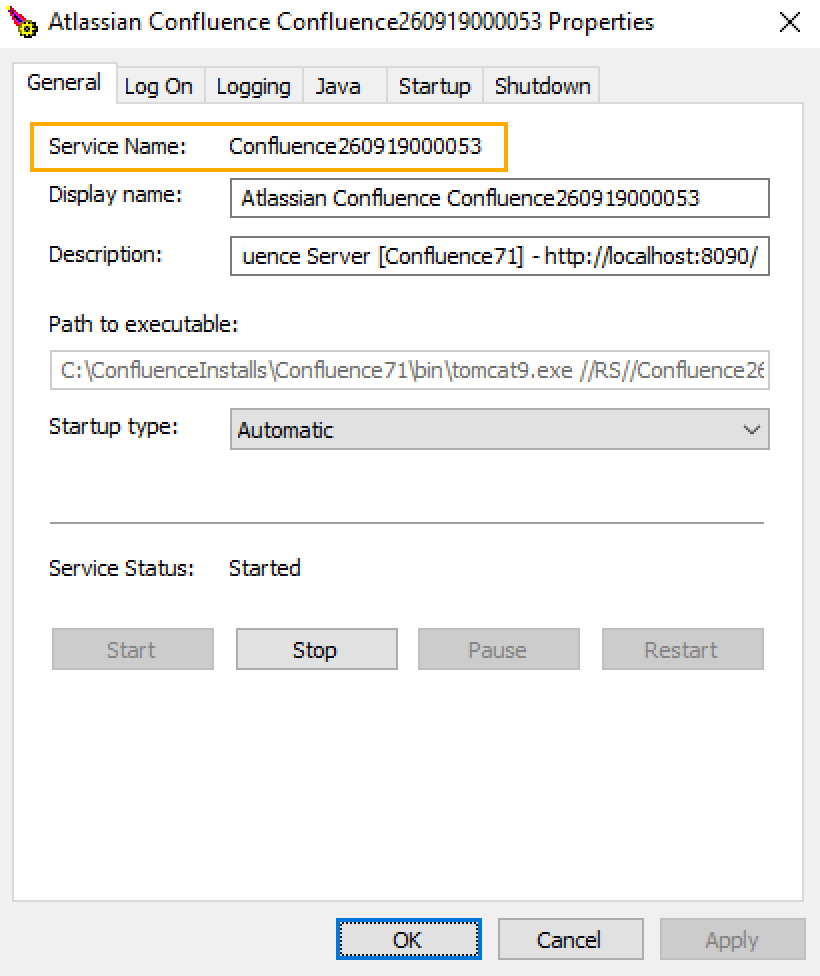
In the above example, the service name is Confluence121213135538.
Open the command window (Choose Start > cmd.exe)
cdto thebindirectory of your Confluence instance (or thebindirectory of your Tomcat installation if you are running Confluence EAR/WAR).Run the following command:
tomcat7w //ES//<SERVICENAME>In this example, the command would betomcat7w //ES//Confluence121213135538The Tomcat version number may be different if you are using an earlier version of Confluence.Click on the
Javatab to see the list of current start-up options: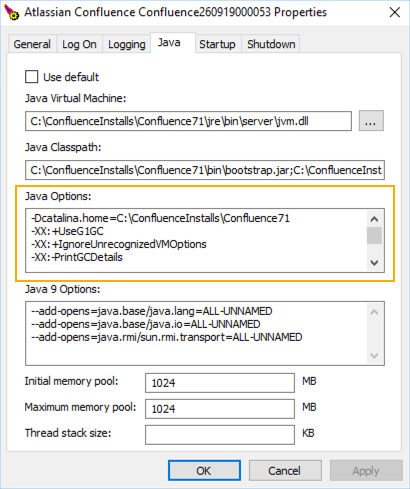
Remove the line containing
atlassian.mail.senddisabledandatlassian.notifications.disabled, or adjust the entry tofalseThe full line may be: -D
atlassian.mail.senddisabled=true
Setting Properties for Windows Services via the Windows Registry
In some versions of Windows, there is no option to add Java variables to the service. In these cases, you must add the properties by viewing the option list in the registry.
Go to the Registry Editor (Start > regedit.exe).
Find the Services entry:
32-bit:
HKEY_LOCAL_MACHINE >> SOFTWARE >> Apache Software Foundation >> Procrun 2.0 >> Confluence64-bit:HKEY_LOCAL_MACHINE >> SOFTWARE >> Wow6432Node >> Apache Software Foundation >> Procrun 2.0 >> Confluence service name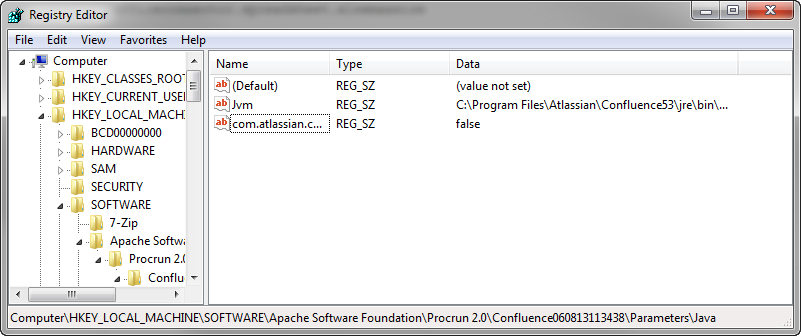
Delete the registry entry containing
atlassian.mail.senddisabled and atlassian.notifications.disabled, or adjust the entry tofalse
Was this helpful?