Convert bitbucket pipeline test reports into pull requests code insight reports
Platform Notice: Cloud Only - This article only applies to Atlassian apps on the cloud platform.
Summary
When a build step generates test results, pipelines will automatically detect and show any failures in the web interface. This works with JUnit and Maven Surefire XML formats, regardless of the language they are written in, as explained in this document. But test report summaries are not automatically updated with the commit.
Solution
Code insights Bitbucket rest APIs provide reports, annotations, and metrics to help you and your team improve code quality in pull requests throughout the code review process. Some of the available code insights are static analysis reports, security scan results, artifact links, unit tests, and build status. Please refer to this document to learn more about Code insights reporting APIs.
One can leverage Code insights Bitbucket rest APIs to download and update the test report summary link to a commit, which will show the reports under relevant pull requests.
Example:
Step 1: Run your tests, store the BITBUCKET_STEP_UUID of the test step in a variable, as shown below, and export it as an artifact.
pipelines:
  default:
    - step:
        name: Tests
        script: # Modify the commands below to build your repository.
          - export IMAGE_NAME2=easyad/easyad_nginx:$BITBUCKET_COMMIT
          - /bin/bash bitbucket_pipeline_tests.sh
          - echo ${BITBUCKET_STEP_UUID} >> step.txt
        artifacts:
          - step.txt
Step 2: Fetch the test report summary from the previous pipeline step using the reports API, and extract test report summary values as a variable.
     - step:
        name: get the test report summary from pipeline step
        script: # Modify the commands below to build your repository.
          - step=$(cat step.txt)
          - apt install jq
          - output=$(curl -vvvv --location -g -u "${EMAIL}:${API_TOKEN}" --request GET "https://api.bitbucket.org/2.0/repositories/${BITBUCKET_WORKSPACE}/${BITBUCKET_REPO_SLUG}/pipelines/${BITBUCKET_PIPELINE_UUID}/steps/${step}/test_reports")
          - echo $output
          - number_of_test_cases=$(echo ${output} | jq -r '.number_of_test_cases')
          - number_of_failed_test_cases=$(echo ${output} | jq -r '.number_of_failed_test_cases')
          - number_of_successful_test_cases=$(echo ${output} | jq -r '.number_of_successful_test_cases')
          - if [ "${number_of_failed_test_cases}" -eq "0" ];then export status_report=PASSED; else export status_report=FAILED; fi
Step 3: Update the extracted values as a test summary report and update them to the ${BITBUCKET_COMMIT} using Code insights Bitbucket rest API.
Sample python script:
#!/usr/bin/env python3
import warnings
warnings.filterwarnings("ignore", category=UserWarning, module="urllib3")

import requests, json, sys

# 1. CONFIGURATION
email       = "abc@abc.com" # Atlassian account email
token       = "xxxxxxxxxxxxxxxxxxxxxxxxx" # API Token with read repository scope
workspace   = "workspace-id"
repo_slug   = "repo-slug"
commit_hash = "abcabcabcabcabcabcabcabcabc"
report_id   = "mysystem-001"

# Enums
report_type = "SECURITY"   # SECURITY, COVERAGE, TEST, BUG
result      = "FAILED"     # PASSED, FAILED, PENDING

# Data values
num_tests     = 123
num_failed    = 5
duration_ms   = 14000
safe_to_merge = False
external_link = {
    "text": "View full report",
    "href": "https://www.mysystem.com/reports/001"
}

# 2. URL
url = (
    f"https://api.bitbucket.org/2.0/repositories/"
    f"{workspace}/{repo_slug}/commit/{commit_hash}/reports/{report_id}"
)
print("URL:", url)

# 3. Payload (no top‑level link)
payload = {
    "title":       "Security scan report",
    "details":     "This commit introduces new dependency vulnerabilities.",
    "report_type": report_type,
    "result":      result,
    "reporter":    "mySystem",
    "data": [
        {"title": "No of Test Cases",     "type": "NUMBER",   "value": num_tests},
        {"title": "Failed Tests",         "type": "NUMBER",   "value": num_failed},
        {"title": "Scan Duration (ms)",   "type": "DURATION", "value": duration_ms},
        {"title": "Safe to merge?",       "type": "BOOLEAN",  "value": safe_to_merge},
        {"title": "External report link", "type": "LINK",     "value": external_link},
    ],
}
print("Payload:\n", json.dumps(payload, indent=2))

# 4. PUT
resp = requests.put(
    url,
    auth=(email, token),
    json=payload,
    headers={"Accept": "application/json"},
    timeout=30,
)

# 5. Response
print("\nResponse status:", resp.status_code)
try:
    print("Response JSON:\n", json.dumps(resp.json(), indent=2))
except:
    print("Response text:\n", resp.text)

if resp.status_code >= 400:
    sys.exit(f"❌ Bitbucket returned {resp.status_code}")
else:
    print("✅ Report uploaded successfully!")
Results
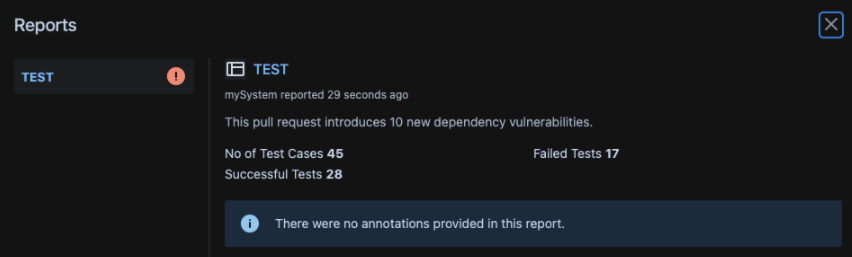
Sample test summary report linked to the pull-request source commit under the Pull Requests Reports section:
Was this helpful?